ArgoCD 아키텍처와 운영 고려점(HA, 메트릭, 백업&복구) 내용을 정리합니다.
본 글은 CloudNet@ 가시다님이 진행하는 CI/CD 스터디 내용을 참고하였습니다.
ArgoCD
Git 저장소의 매니페스트(Helm/Kustomize 등)를 읽어 클러스터와 동기화하고, 드리프트 감지·롤백·멀티클러스터 배포 등을 제공하는 도구입니다.
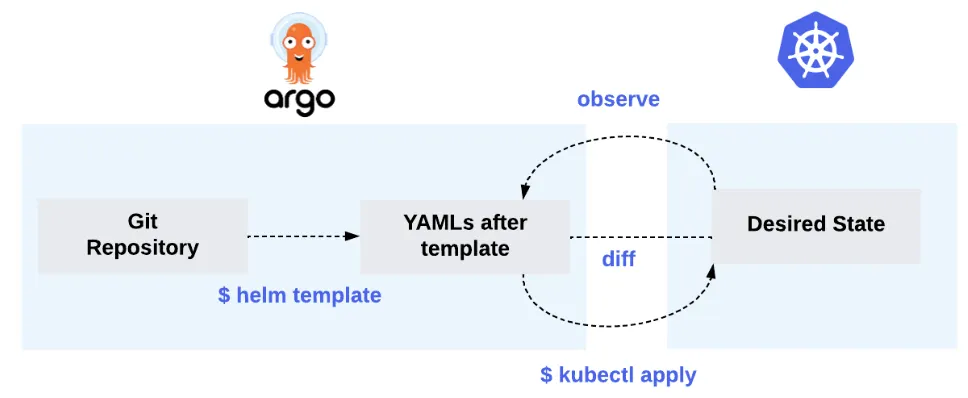
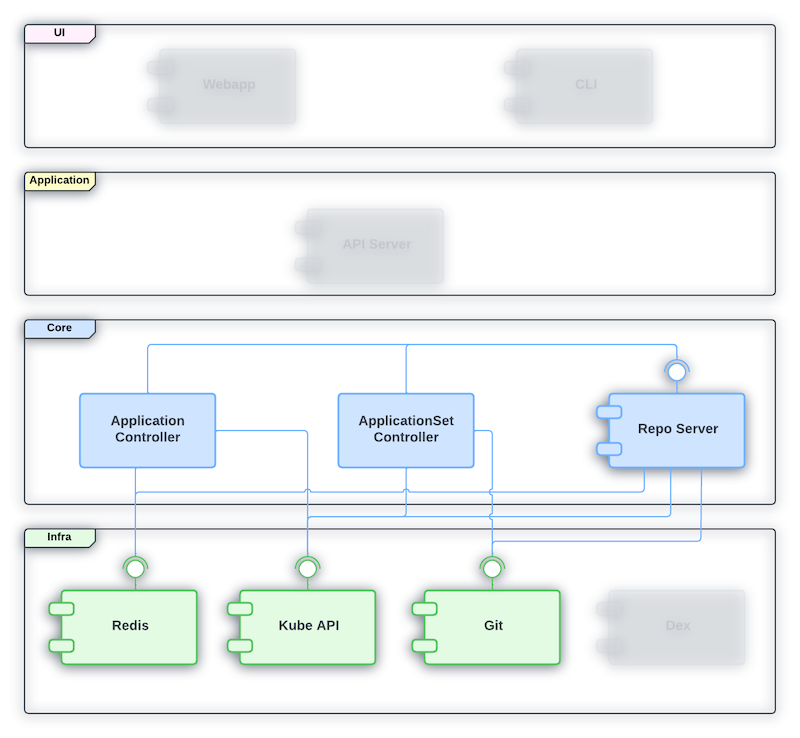
ArgoCD 구성 아키텍처는 다음과 같이 구성됩니다.
API Server : Argo CD의 중앙 허브이자 외부 인터페이스로, 사용자 요청을 처리하고, 인증 및 권한 제어
Repository Service : Git 저장소에서 배포 가능한 YAML 매니페스트를 생성하고, Helm/Kustomize 등의 템플릿 렌더링 수행
Application Controller : Git 상태와 클러스터 상태를 비교하고(Diff), 불일치 시 동기화(Sync)를 수행
실습 환경 구성
# kind k8s 배포
kind create cluster --name myk8s --image kindest/node:v1.32.8 --config - <https://geek-cookbook.github.io/charts/
helm install kube-ops-view geek-cookbook/kube-ops-view --version 1.2.2 --set service.main.type=NodePort,service.main.ports.http.nodePort=30001 --set env.TZ="Asia/Seoul" --namespace kube-system

# 포트 포워딩
kubectl port-forward service/kube-ops-view -n kube-system 30001:8080

# kube-ops-view 접속 URL 확인
open "http://127.0.0.1:30001/#scale=1.5"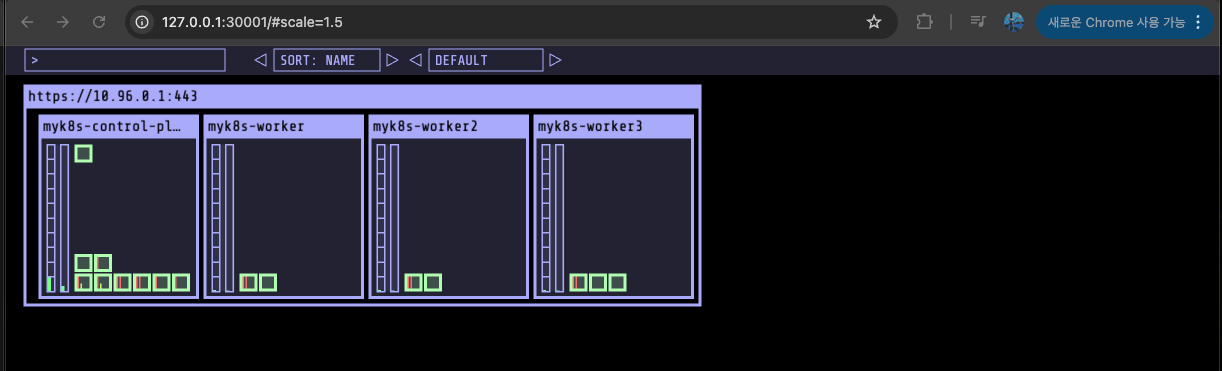
ArgoCD 배포 및 구소 요소
kubectl create ns argocd
cat < argocd-values.yaml
server:
  service:
    type: NodePort
    nodePortHttps: 30002
  extraArgs:
    - --insecure  # HTTPS 대신 HTTP 사용
EOF

# 설치 : Argo CD v3.1.9 , (참고) 책 버전 Argo CD v2.1 ~ v2.2
# https://github.com/argoproj/argo-helm/blob/main/charts/argo-cd/values.yaml
helm repo add argo https://argoproj.github.io/argo-helm
helm install argocd argo/argo-cd --version 9.0.5 -f argocd-values.yaml --namespace argocd

# 각 구성요소 확인
kubectl get all -n argocd

# ArgoCD CRD 확인
kubectl get crd | grep argo
applications.argoproj.io      2025-11-08T02:12:37Z
applicationsets.argoproj.io   2025-11-08T02:12:37Z
appprojects.argoproj.io       2025-11-08T02:12:37Z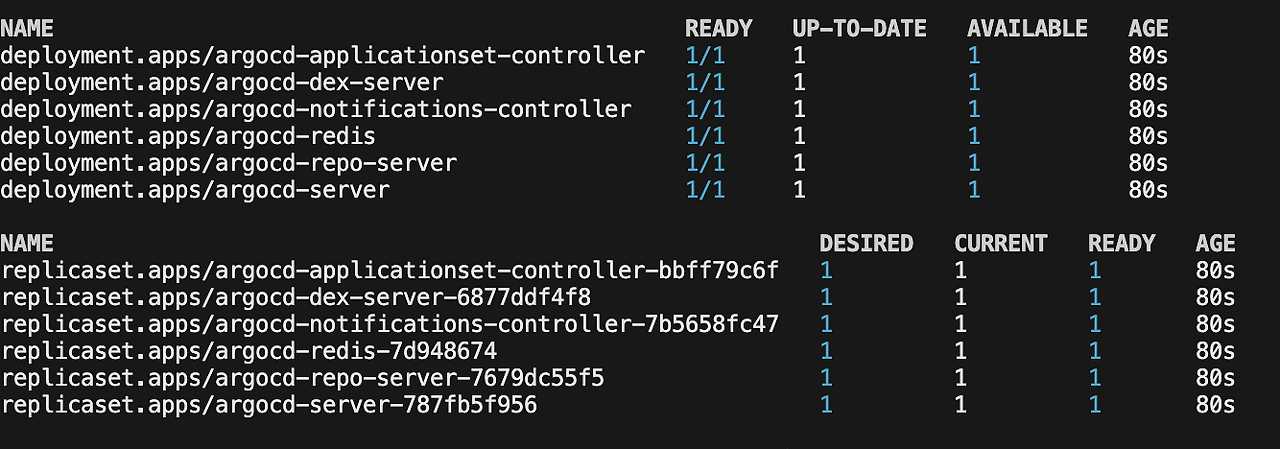
자격 증명 ?
ArgoCD → 레파지토리, 클러스터 접근을 위한 자격증명은 Secret과 Configmap을 통해 설정합니다.
레파지토리 자격 증명 : rgocd.argoproj.io/secret-type: repository 레이블 통해 접근 지정
# HTTPS 인증 방식 (예시)
apiVersion: v1
kind: Secret
metadata:
  name: repo-credentials-https
  namespace: argocd                             # 반드시 argocd 네임스페이스여야 함
  labels:
    argocd.argoproj.io/secret-type: repository  # Argo CD가 이 Secret을 “저장소 접근 자격”으로 인식하는 라벨
stringData:
  url: https://github.com/your-org/private-repo.git
  username: your-github-username
  password: ghp_xxxxxxxxxxxxxxxxxxxxxxx         # Personal Access Token (PAT) 또는 비밀번호


# SSH Key 인증 방식 (예시)
apiVersion: v1
kind: Secret
metadata:
  name: repo-credentials-ssh
  namespace: argocd
  labels:
    argocd.argoproj.io/secret-type: repository
stringData:
  url: git@github.com:your-org/private-repo.git  # SSH 형태의 주소
  sshPrivateKey: |
    -----BEGIN OPENSSH PRIVATE KEY-----
    MIIEvQIBADANBgkqhkiG9w0BAQEFAASC...
    -----END OPENSSH PRIVATE KEY-----
클러스터 자격 증명 : argocd.argoproj.io/secret-type: cluster 레이블 지정
apiVersion: v1
kind: Secret
metadata:
  name: cluster-credentials-dev
  namespace: argocd
  labels:
    argocd.argoproj.io/secret-type: cluster
stringData:
  name: dev-cluster                         # Argo CD 내에서 표시될 클러스터 이름
  server: https://123.45.67.89:6443         # 대상 클러스터의 API 서버 주소
  config: |                                 # JSON 형태의 kubeconfig 일부. Argo CD가 인증에 사용
    {
      "bearerToken": "eyJhbGciOiJSUzI1NiIsImtpZCI6...", # 대상 클러스터의 ServiceAccount로부터 추출한 토큰
      "tlsClientConfig": {
        "insecure": false,                              # true일 경우 TLS 검증 비활성화 (개발용)
        "caData": "LS0tLS1CRUdJTiBDRVJUSUZJQ0FURS0t..." # 클러스터 CA 인증서 (Base64 인코딩된 값)
      }
    }
- helm uninstall -n argocd argocd && kubectl delete ns argocd 다음 실습을 위해 ArgoCD 삭제
ArgoCD 운영
ArgoCD 운영을 위해 고려해야할 점은 다음과 같습니다.
- ArgoCD HA 구성
- ArgoCD 메트릭 모니터링
- 백업 & 복구
ArgoCD HA 구성
ArgoCD HA 구성 검토
- Argo CD는 기본적으로 stateless 설계이며, 모든 상태(애플리케이션 정의 등)는 Kubernetes의 etcd에 저장됨.
- Redis는 캐시 용도로만 사용되며, 장애 시 재구성되어도 서비스 손실이 없음.
- HA 설치 매니페스트가 제공되며, 최소 3 노드 이상과 Pod anti-affinity 설정이 필요. IPv6 전용 클러스터는 미지원
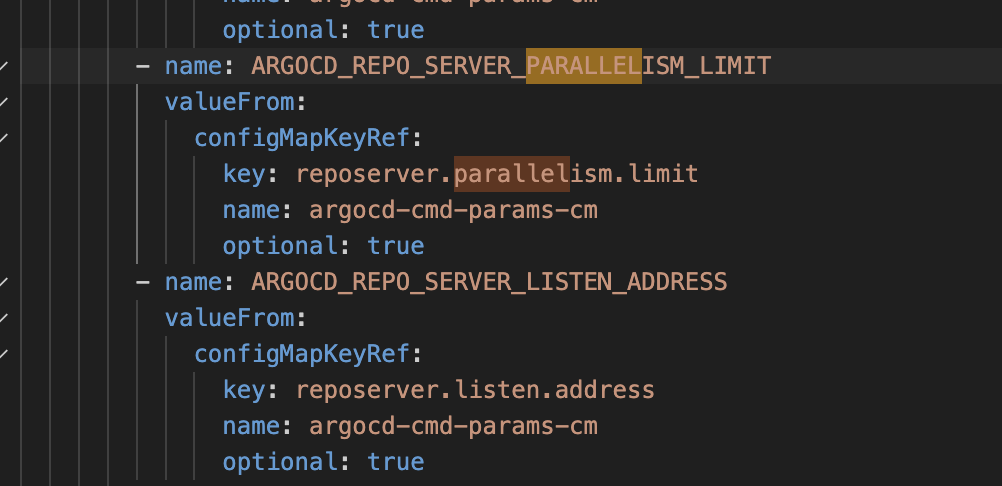
argocd-repo-server
- Git 저장소를 클론하고 매니페스트를 생성하는 역할
- 병렬 매니페스트 생성 수는 -parallelismlimit 플래그로 조정 가능. 메모리 부족/스레드 제한 이슈 주의
- 디스크 공간 부족 방지를 위해 저장소 수가 많거나 파일이 많으면 Persistent Volume 마운트 권장
- 매니페스트 캐시 만료(-repo-cache-expiration 등)를 통해 렌더링 빈도 조정 가능
argocd-application-controller
- 실제로 Git 매니페스트와 클러스터 상태를 비교(diff)하고 Sync를 수행하는 핵심 엔진
- 동시 처리 큐 수(-status-processors, -operation-processors) 증가로 애플리케이션 수가 많을 때 성능 향상 가능
- 셰어(sharding)를 통해 컨트롤러 복제(replica)를 여러 개 띄우고 클러스터 부하 분산 가능

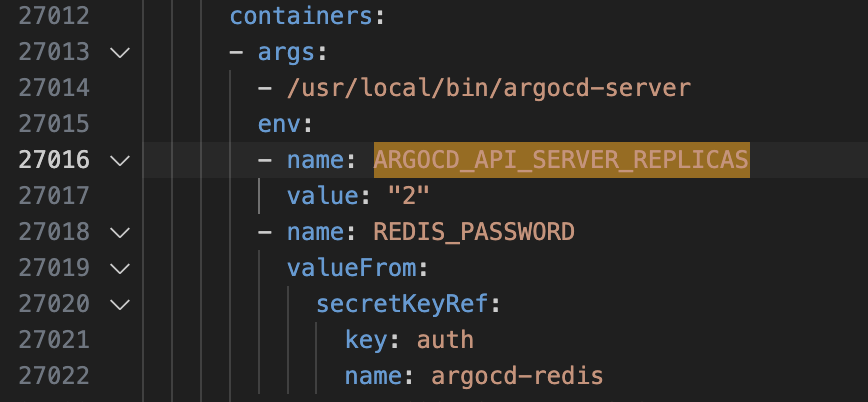
argocd-server
- UI/API 서버로, 상태 저장이 거의 없으며 복제 수를 3개 이상 권장
- ARGOCD_API_SERVER_REPLICAS 환경변수로 복제 수 지정 가능
argocd-dex-server & argocd-redis
- Dex 인증 서버는 메모리 기반 DB 사용으로 다중 인스턴스 데이터 불일치 위험 있음
- Redis는 기본 구성 시 Sentinel을 이용해 3대 구성 등 HA 방식 권고
ArgoCD HA 구성
# 매니페스트 파일 작성 및 배포
mkdir resources
cat << EOF > resources/namespace.yaml
apiVersion: v1
kind: Namespace
metadata:
  name: argocd
EOF
kubectl apply -f resources/namespace.yaml

curl -O https://raw.githubusercontent.com/argoproj/argo-cd/refs/heads/master/manifests/ha/install.yaml
mv install.yaml resources/
kubectl apply -f resources/install.yaml -n argocd

kubectl get all -n arogcd

# 접근
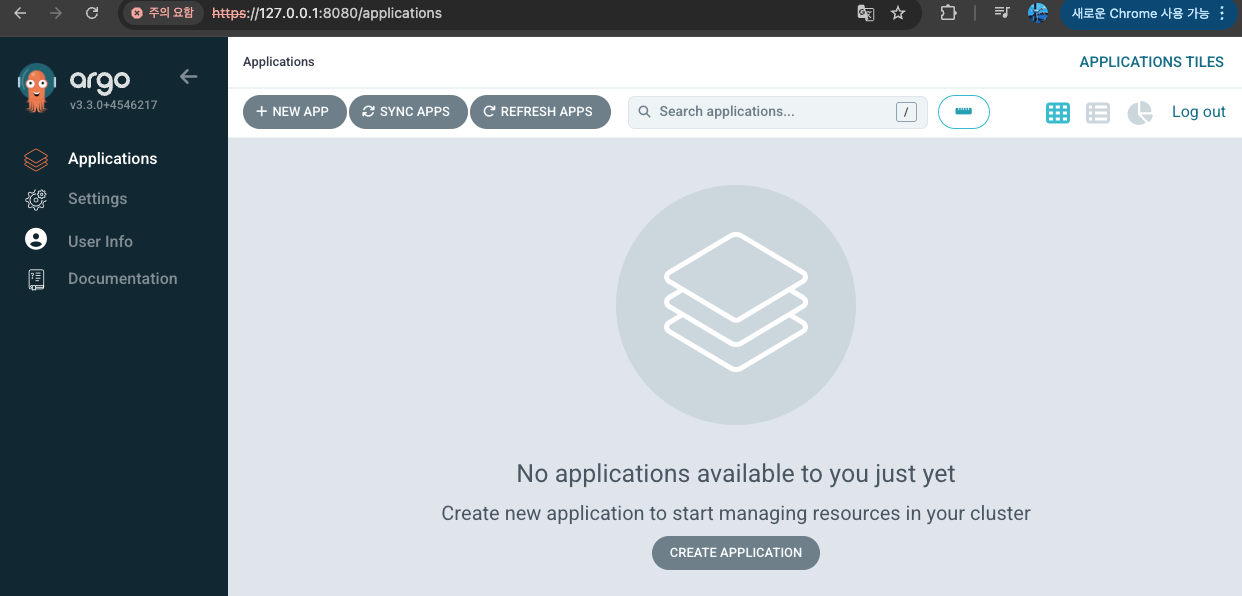
kubectl port-forward svc/argocd-server -n argocd 8080:80
open https://127.0.0.1:8080


#패스워드 확인
kubectl get secret -n argocd argocd-initial-admin-secret -o jsonpath='{.data.password}' | base64 -d ; echo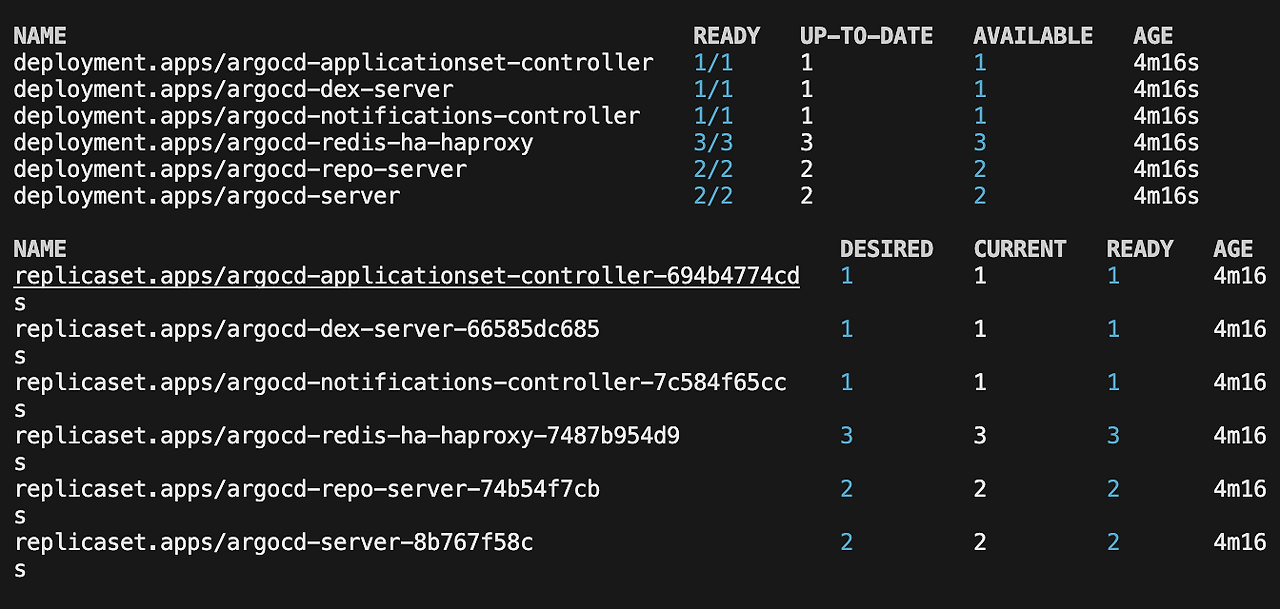
ArgoCD 자체 관리
Gitops 수동 제어를 최소화하기 위해 ArgoCD 자체도 관리하기 위해 자체 관리 설정을 진행하겠습니다.
# 신규 Git 레파지토리 생성
# resoruces 디렉토리 경로
git add . && git commit -m "Deploy Argo CD " && git push -u origin main - Argo CD UI → Settings → Repo 에 자신의 Repo 추가 (repoURL)
- spec.source.repoURL 에 자신의 REPO 입력
cat <https://github.com/HanHoRang31/argocd-sample
    targetRevision: main
  syncPolicy:
    automated: {}
  destination:
    namespace: argocd
    server: https://kubernetes.default.svc
EOF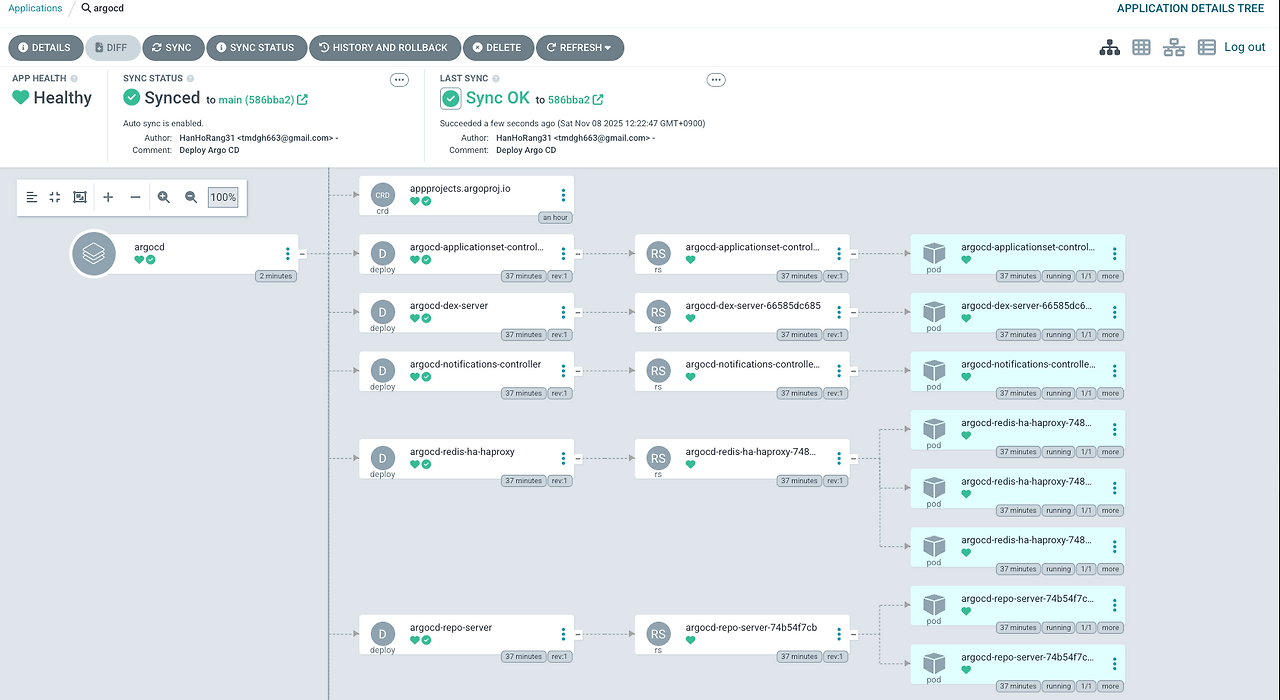
ArgoCD 관찰 가능성 설정
kube-prometheus-stack 설치하고, ArgoCD 전용 대시보드를 구성하겠습니다.
# repo 추가
helm repo add prometheus-community https://prometheus-community.github.io/helm-charts

# 파라미터 파일 생성
cat < monitor-values.yaml
prometheus:
  prometheusSpec:
    scrapeInterval: "15s"
    evaluationInterval: "15s"
  service:
    type: NodePort
    nodePort: 30002

grafana:
  defaultDashboardsTimezone: Asia/Seoul
  adminPassword: prom-operator
  service:
    type: NodePort
    nodePort: 30003

alertmanager:
  enabled: false
defaultRules:
  create: false
prometheus-windows-exporter:
  prometheus:
    monitor:
      enabled: false
EOT
cat monitor-values.yaml

# 배포
helm install kube-prometheus-stack prometheus-community/kube-prometheus-stack --version 75.15.1 \
-f monitor-values.yaml --create-namespace --namespace monitoring

# 접속 확인
open http://127.0.0.1:30002
프로메테우스 모니터링 메트릭 수집은 라벨이 release: kube-prometheus-stack인 모든 ServiceMonitor 및 PodMonitor 인 대상으로 진행합니다.
#ArgoCD 서비스 메트릭 파드
kubectl get svc -n argocd | grep metrics
argocd-metrics                            ClusterIP   10.96.89.255    <none>        8082/TCP                     10h
argocd-notifications-controller-metrics   ClusterIP   10.96.120.177   <none>        9001/TCP                     10h
argocd-server-metrics                     ClusterIP   10.96.185.251   <none>        8083/TCP                     10h


# 테스트용 파드 기동
cat <<EOF | kubectl apply -f -
apiVersion: v1
kind: Pod
metadata:
  name: nginx
  labels:
    app: nginx
spec:
  containers:
  - name: nginx
    image: nginx:alpine
    ports:
    - containerPort: 80
EOF


# ServiceMonitor 생성
cat <<EOF | kubectl apply -f -
apiVersion: monitoring.coreos.com/v1
kind: ServiceMonitor
metadata:
  name: argocd-metrics
  namespace: monitoring
  labels:
    release: kube-prometheus-stack # 프로메테우스 수집 라벨 설정
spec:
  selector:
    matchLabels:
      app.kubernetes.io/name: argocd-metrics # 메트릭 수집 대상
  endpoints:
    - port: metrics
  namespaceSelector:
    matchNames:
      - argocd
EOF

# application-controller 메트릭 호출
kubectl exec -it -n default nginx -- curl argocd-metrics.argocd.svc:8082/metrics

# ServiceMonitor 생성
cat <<EOF | kubectl apply -f -
apiVersion: monitoring.coreos.com/v1
kind: ServiceMonitor
metadata:
  name: argocd-server-metrics
  namespace: monitoring
  labels:
    release: kube-prometheus-stack
spec:
  selector:
    matchLabels:
      app.kubernetes.io/name: argocd-server-metrics
  endpoints:
    - port: metrics
  namespaceSelector:
    matchNames:
      - argocd
EOF

# argocd-server 메트릭 호출
kubectl exec -it -n default nginx -- curl argocd-server-metrics.argocd.svc:8083/metrics


cat <<EOF | kubectl apply -f -
apiVersion: monitoring.coreos.com/v1
kind: ServiceMonitor
metadata:
  name: argocd-repo-server-metrics
  namespace: monitoring
  labels:
    release: kube-prometheus-stack
spec:
  selector:
    matchLabels:
      app.kubernetes.io/name: argocd-repo-server
  endpoints:
    - port: metrics
  namespaceSelector:
    matchNames:
      - argocd
EOF
# repo-server 메트릭 호출
kubectl exec -it -n default nginx -- curl argocd-repo-server.argocd.svc:8084/metrics


# 나머지 ServiceMonitor 생성
cat <<EOF | kubectl apply -f -
apiVersion: monitoring.coreos.com/v1
kind: ServiceMonitor
metadata:
  name: argocd-applicationset-controller-metrics
  namespace: monitoring
  labels:
    release: kube-prometheus-stack
spec:
  selector:
    matchLabels:
      app.kubernetes.io/name: argocd-applicationset-controller
  endpoints:
    - port: metrics
  namespaceSelector:
    matchNames:
      - argocd
---
apiVersion: monitoring.coreos.com/v1
kind: ServiceMonitor
metadata:
  name: argocd-dex-server
  namespace: monitoring
  labels:
    release: kube-prometheus-stack
spec:
  selector:
    matchLabels:
      app.kubernetes.io/name: argocd-dex-server
  endpoints:
    - port: metrics
  namespaceSelector:
    matchNames:
      - argocd
---
apiVersion: monitoring.coreos.com/v1
kind: ServiceMonitor
metadata:
  name: argocd-redis-haproxy-metrics
  namespace: monitoring
  labels:
    release: kube-prometheus-stack
spec:
  selector:
    matchLabels:
      app.kubernetes.io/name: argocd-redis-ha-haproxy
  endpoints:
    - port: http-exporter-port
  namespaceSelector:
    matchNames:
      - argocd
---
apiVersion: monitoring.coreos.com/v1
kind: ServiceMonitor
metadata:
  name: argocd-notifications-controller
  namespace: monitoring
  labels:
    release: kube-prometheus-stack
spec:
  selector:
    matchLabels:
      app.kubernetes.io/name: argocd-notifications-controller-metrics
  endpoints:
    - port: metrics
  namespaceSelector:
    matchNames:
      - argocd
EOF


# 객체 생성 확인
kubectl get servicemonitors.monitoring.coreos.com -A | grep argocd
NAMESPACE    NAME                                             AGE
monitoring   argocd-applicationset-controller-metrics         7s
monitoring   argocd-dex-server                                7s
monitoring   argocd-metrics                                   7m26s
monitoring   argocd-notifications-controller                  7s
monitoring   argocd-redis-haproxy-metrics                     7s
monitoring   argocd-repo-server-metrics                       54s
monitoring   argocd-server-metrics                            65s


# argocd-server 메트릭 호출
kubectl exec -it -n default nginx -- curl argocd-server-metrics.argocd.svc:8083/metrics
프로메테우스 메트릭 확인
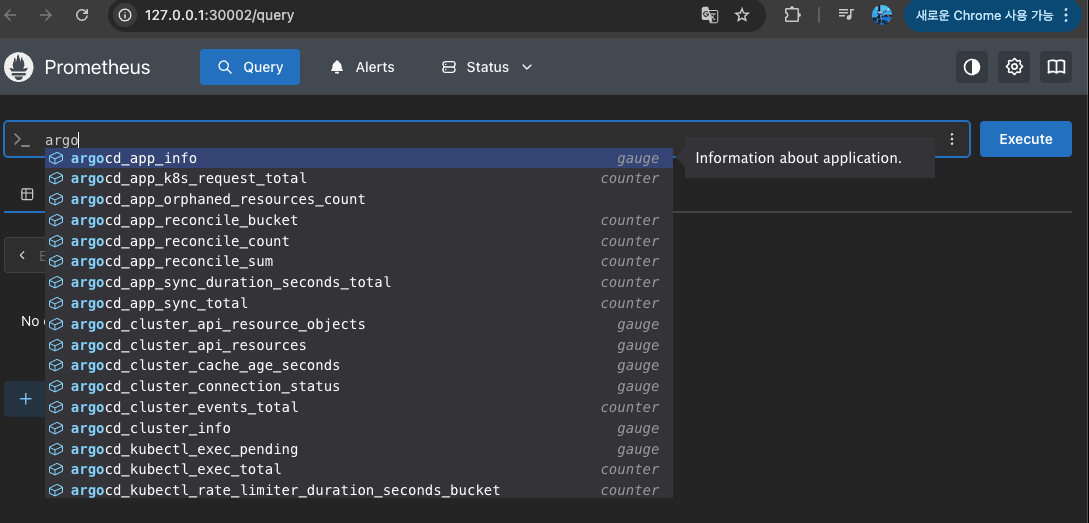
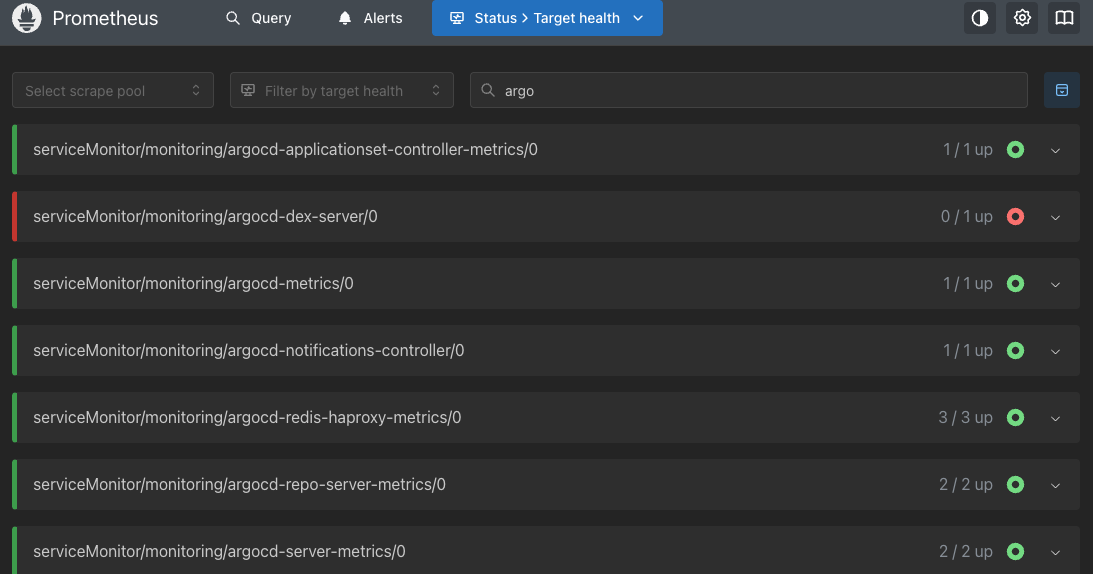
그라파나 대시보드 설정
- 대시보드는 공식 예제 대시보드 JSON 사용 (Embed GitHub)
- 대시보드 > import > json 기입
open http://127.0.0.1:30003 # macOS

# 계정 admin/prom-operator 입력 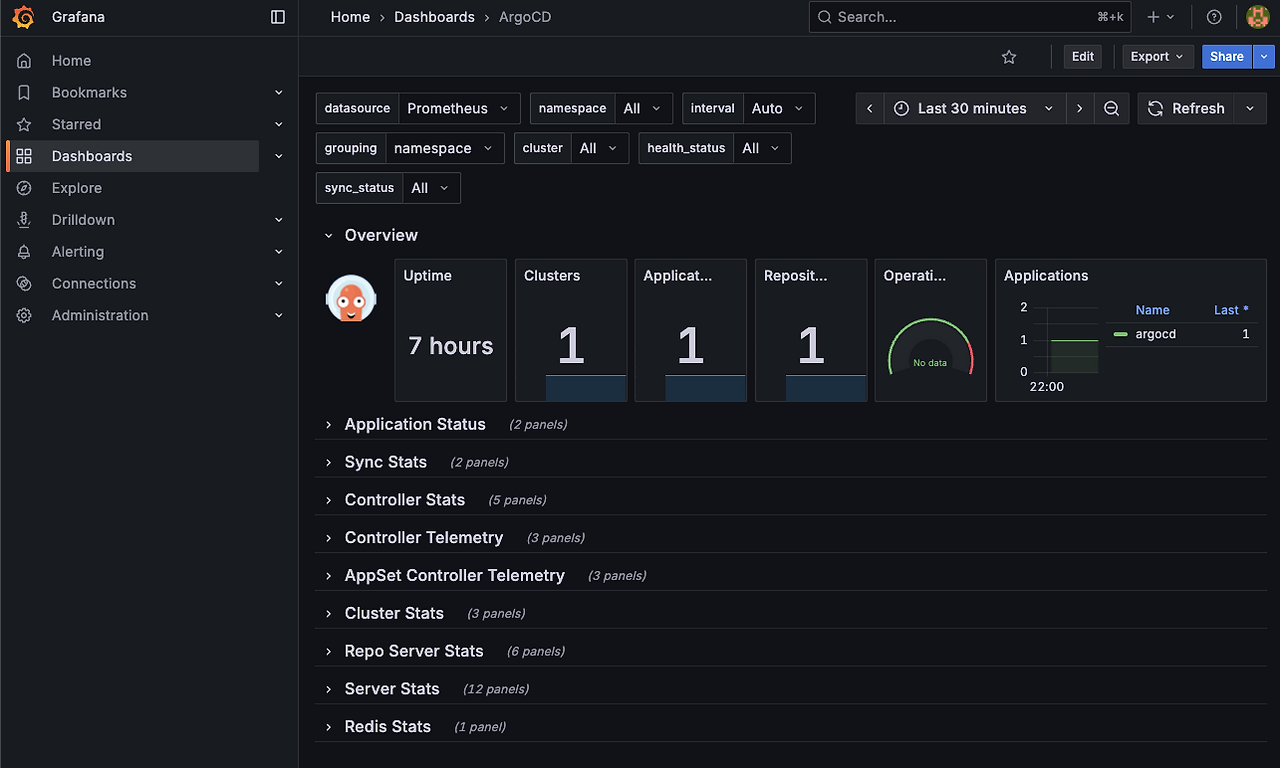
# 예제 애플리케이션 생성
# guestbook helm 차트 애플리케이션 생성
cat <https://github.com/argoproj/argocd-example-apps
    targetRevision: HEAD
  syncPolicy:
    automated:
      enabled: true
      prune: true
      selfHeal: true
    syncOptions:
    - CreateNamespace=true
  destination:
    namespace: guestbook
    server: https://kubernetes.default.svc
EOF
주요 메트릭 모니터링 - doc
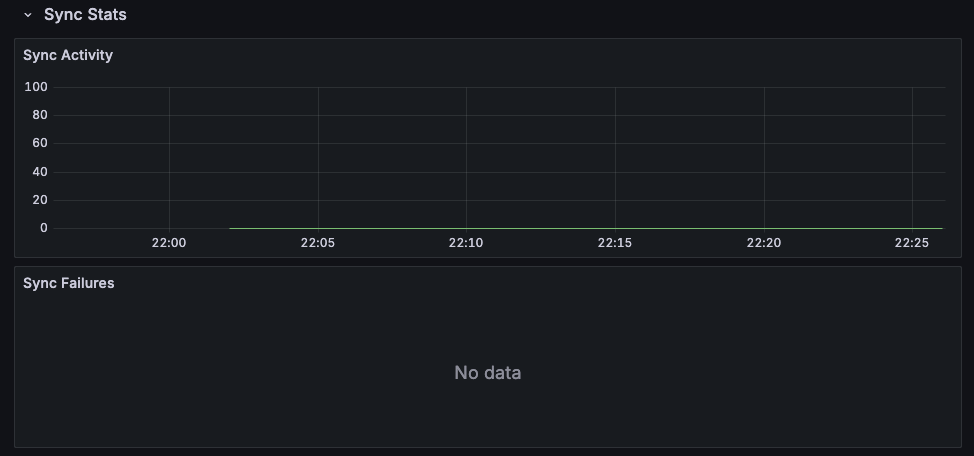
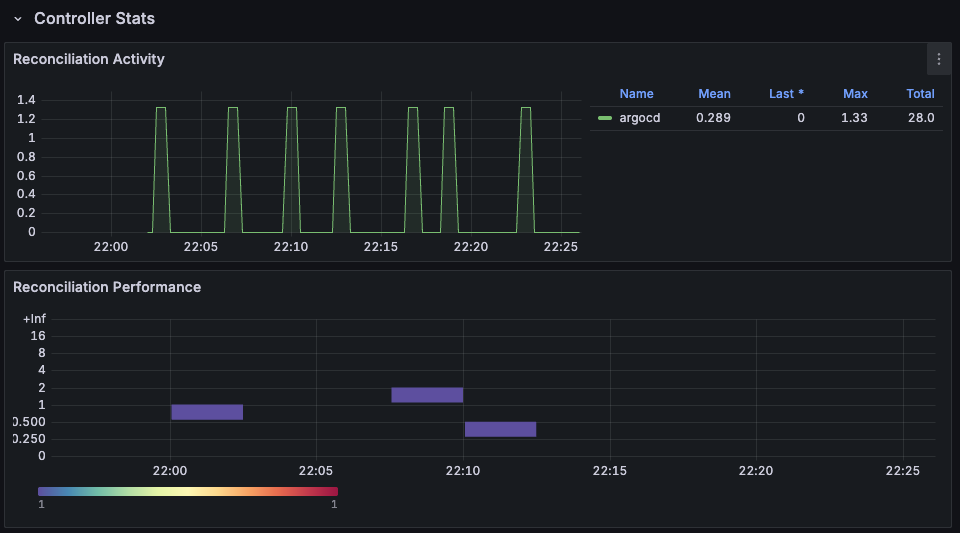
- Diff 지연 시간 (argocd_app_reconcile_time): 이 시간이 길어진다는 것은 Git의 Desired State와 Live State를 비교하는 데 시간이 오래 걸린다는 의미입니다. 애플리케이션 수가 많거나 컨트롤러 리소스가 부족할 때 발생할 수 있습니다.
- Sync 실패율 (argocd_app_sync_total): 성공한 Sync 횟수 대비 실패한 Sync 횟수가 증가하는지 확인해야 합니다. 이는 배포하려는 매니페스트에 문제가 있거나, 대상 클러스터에 권한/제한 문제가 있음을 나타낼 수 있습니다.
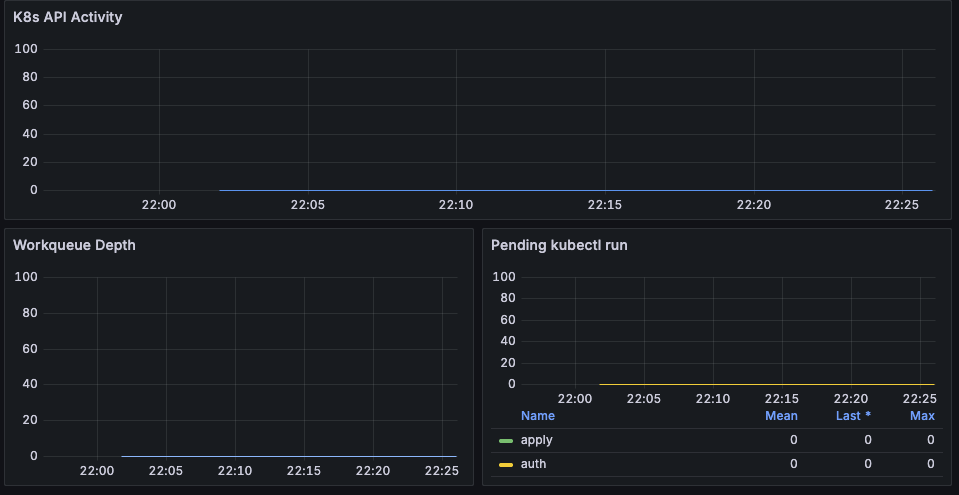
- API 지연 시간: argocd_request_duration_seconds의 P99(99th Percentile) 값이 높아지면, 사용자 경험(Web UI, CLI)이 저하되고 있음을 의미합니다. API 서버의 자원을 확장하거나 부하를 분산해야 할 수 있습니다.
재해 복구
argocd cli를 통해 백업 및 복원을 진행합니다.
# arogcd cli 설치
brew install argocd

# argocd 인증, 패스워드 확인
kubectl get secret -n argocd argocd-initial-admin-secret -o jsonpath='{.data.password}' | base64 -d ; echo

ARGOPW=-MN5-rVXqOiXILqp
argocd login localhost:8080  --username admin --password $ARGOPW --insecure

# 백업 생성
argocd admin export -n argocd > backup.yaml
cat backup.yaml | head
apiVersion: v1
data:
  resource.customizations.ignoreResourceUpdates.ConfigMap: |
    jqPathExpressions:
      # Ignore the cluster-autoscaler status
      - '.metadata.annotations."cluster-autoscaler.kubernetes.io/last-updated"'
      # Ignore the annotation of the legacy Leases election
      - '.metadata.annotations."control-plane.alpha.kubernetes.io/leader"'
  resource.customizations.ignoreResourceUpdates.Endpoints: |
    jsonPointers:
신규 클러스터 생성 및 복원
# 신규 클러스터 생성
kind create cluster --name myk8s2 --image kindest/node:v1.32.8 --config - <<EOF
kind: Cluster
apiVersion: kind.x-k8s.io/v1alpha4
nodes:
- role: control-plane
  extraPortMappings:
  - containerPort: 31000
    hostPort: 31000
  - containerPort: 31001
    hostPort: 31001
  - containerPort: 31002
    hostPort: 31002
  - containerPort: 31003
    hostPort: 31003
- role: worker
- role: worker
- role: worker
EOF

# 컨텍스트 확인
kubectl config get-contexts
CURRENT   NAME          CLUSTER       AUTHINFO      NAMESPACE
          kind-myk8s                                                             kind-myk8s                                                             kind-myk8s
*         kind-myk8s2                                                            kind-myk8s2                                                            kind-myk8s2

# alias 설정
alias k8s1='kubectl --context kind-myk8s'
alias k8s2='kubectl --context kind-myk8s2'

k8s2 get pods -A
NAMESPACE            NAME                                           READY   STATUS    RESTARTS   AGE
kube-system          coredns-668d6bf9bc-88s7d                       1/1     Running   0          3m39s
kube-system          coredns-668d6bf9bc-gvv96                       1/1     Running   0          3m39s
kube-system          etcd-myk8s2-control-plane                      1/1     Running   0          3m46s
kube-system          kindnet-kqmcg                                  1/1     Running   0          3m37s
kube-system          kindnet-l52fb                                  1/1     Running   0          3m37s
kube-system          kindnet-rnbzc                                  1/1     Running   0          3m37s
kube-system          kindnet-wz2dl                                  1/1     Running   0          3m40s
kube-system          kube-apiserver-myk8s2-control-plane            1/1     Running   0          3m46s
kube-system          kube-controller-manager-myk8s2-control-plane   1/1     Running   0          3m45s
kube-system          kube-proxy-797lr                               1/1     Running   0          3m37s
kube-system          kube-proxy-7rqq4                               1/1     Running   0          3m37s
kube-system          kube-proxy-ckz8b                               1/1     Running   0          3m37s
kube-system          kube-proxy-hpz5w                               1/1     Running   0          3m40s
kube-system          kube-scheduler-myk8s2-control-plane            1/1     Running   0          3m46s
local-path-storage   local-path-provisioner-7dc846544d-8nldx        1/1     Running   0          3m39s

# 신규 클러스터 내 HA argocd 배포
k8s2 apply -f resources/namespace.yaml
k8s2 apply -f resources/install.yaml -n argocd

# 포트포워딩
kubectl port-forward svc/argocd-server -n argocd 8081:80 --context kind-myk8s2


k8s2 get secret -n argocd argocd-initial-admin-secret -o jsonpath='{.data.password}' | base64 -d ; echo
uDs4B3gro5oT6zKT

ARGOPW2=uDs4B3gro5oT6zKT
argocd login localhost:8081  --username admin --password $ARGOPW2 --insecure


# 다른 클러스터에서 복원하기
argocd admin import -n argocd - < backup.yaml
import process started argocd
/ConfigMap argocd-cm in namespace argocd updated
/ConfigMap argocd-rbac-cm in namespace argocd updated
/ConfigMap argocd-ssh-known-hosts-cm in namespace argocd updated
/ConfigMap argocd-tls-certs-cm in namespace argocd updated
/Secret argocd-secret in namespace argocd updated
/Secret repo-1294480722 in namespace argocd created
argoproj.io/Application argocd in namespace argocd created
{"level":"info","msg":"Warning: metadata.finalizers: \"resources-finalizer.argocd.argoproj.io\": prefer a domain-qualified finalizer name including a path (/) to avoid accidental conflicts with other finalizer writers","time":"2025-11-08T23:16:32+09:00"}
argoproj.io/Application guestbook in namespace argocd created
Import process completed successfully in namespace argocd at 2025-11-08T23:16:32+09:00, duration: 140.927875ms


# 복원 확인
open http://127.0.0.1:8081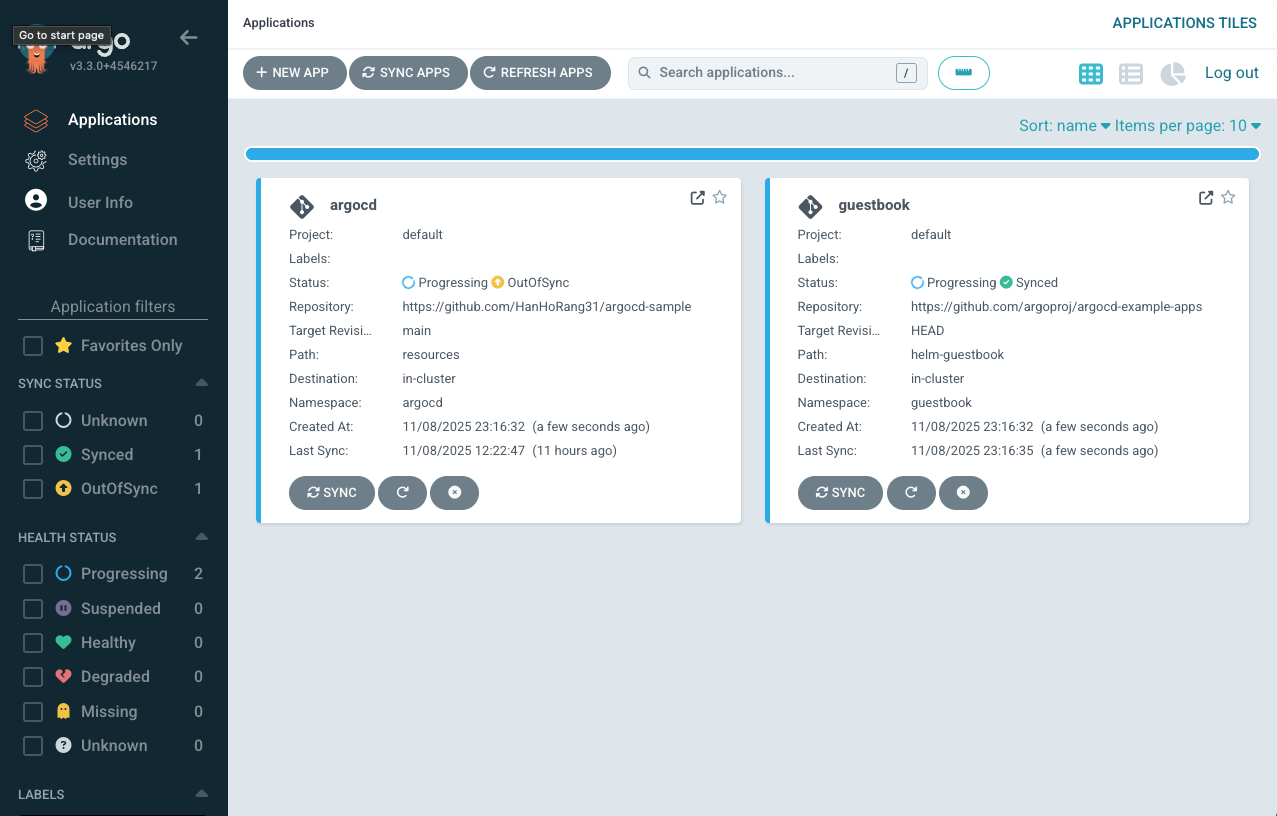
'Cloud' 카테고리의 다른 글
| ArgoCD로 멀티클러스터 관리하기 (0) | 2025.11.23 |
|---|---|
| ArgoCD 접근제어 설정 방법 (0) | 2025.11.16 |
| Gitops CI & CD 구성(Jenkins & ArgoCD) (0) | 2025.11.02 |
| Helm 과 lgtm Stack 맛보기(Loki) (0) | 2025.10.26 |
| 쿠버네티스 GItOps (0) | 2025.10.19 |