ArgoCD를 통해 멀티클러스터 관리하는 방법을 기술합니다.
학습 내용은 CloudNet@ 가시다님이 진행하는 CI/CD스터디를 참고하였습니다.
ArgoCD 관리 유형
ArgoCD 멀티클러스터 관리 유형은 다음과 같이 분류 됩니다.
|
구분
|
CLI/API 기반 오토메이션
|
App of Apps
|
App of Apps + Templating
|
ApplicationSet
|
|
Git 기반
|
✅ Yes — 파이프라인(GitHub Actions 등)도 Git에 저장
|
✅ Yes — 매니페스트 Git 저장
|
✅ Yes — Helm 템플릿 + values 저장
|
✅ Yes — ApplicationSet 정의가 Git에 저장
|
|
선언적(Declarative)
|
❌ No — 명령형(Imperative) 스크립트 기반
|
✅ Yes
|
✅ Yes — 템플릿 기반 선언적
|
✅ Yes — 완전 선언적
|
|
자동화 수준
|
✅ 매우 높음 — 앱 자동 생성
|
❌ 낮음 — 환경 추가 시 YAML 직접 생성
|
❌ 중간 — values.yaml 수동 수정 필요
|
✅ 매우 높음 — Git 구조만 맞으면 앱 자동 생성
|
분류 방법에 따른 스크립트 형태는 다음과 같이 구성됩니다.
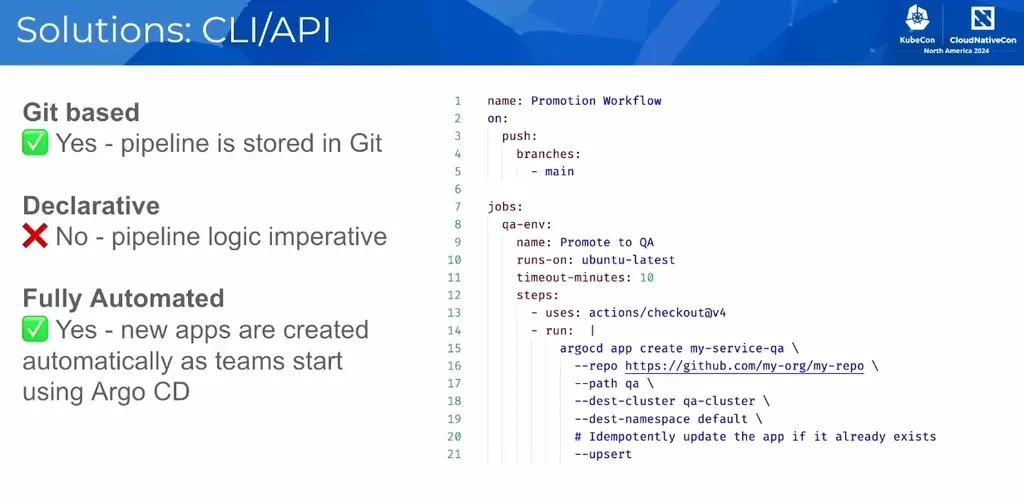


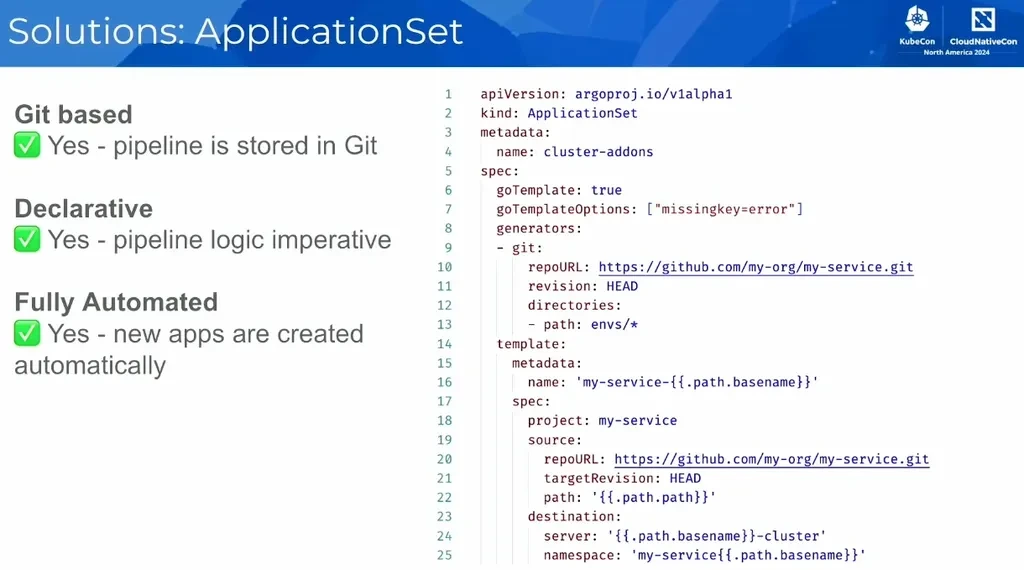
참고 - [CNCF] Mastering ApplicationSet: Advanced Argo CD Automation - Alexander Matyushentsev, Akuity
ArgoCD 멀티클러스터 관리 유형 중 App of apps패턴과 ApplicationSet를 실습하겠습니다.
멀티클러스터 환경 구성
- mgmt k8s 구성 + Ingress(Nginx) + ArgoCD 구성
# kind k8s 배포
kind create cluster --name mgmt --image kindest/node:v1.32.8 --config - <https://raw.githubusercontent.com/kubernetes/ingress-nginx/main/deploy/static/provider/kind/deploy.yaml

# TLS 통신을 Ingress Controller에서 Terminate하지 않고, 그대로 백엔드 Pod로 전달하기 위한 설정
kubectl edit -n ingress-nginx deployments/ingress-nginx-controller
...
args :
 - --enable-ssl-passthrough

# 인증서 생성
openssl req -x509 -nodes -days 365 -newkey rsa:2048 \
  -keyout argocd.example.com.key \
  -out argocd.example.com.crt \
  -subj "/CN=argocd.example.com/O=argocd"


# argocd 네임스페이스 생성
kubectl create ns argocd

# tls 시크릿 생성
kubectl -n argocd create secret tls argocd-server-tls \
  --cert=argocd.example.com.crt \
  --key=argocd.example.com.key


# Argocd 구성
cat < argocd-values.yaml
global:
  domain: argocd.example.com

server:
  ingress:
    enabled: true
    ingressClassName: nginx
    annotations:
      nginx.ingress.kubernetes.io/force-ssl-redirect: "true"
      nginx.ingress.kubernetes.io/ssl-passthrough: "true"
    tls: true
EOF


# 설치 : Argo CD v3.1.9
helm repo add argo https://argoproj.github.io/argo-helm
helm install argocd argo/argo-cd --version 9.0.5 -f argocd-values.yaml --namespace argocd

# 도메인 추가
echo "127.0.0.1 argocd.example.com" | sudo tee -a /etc/hosts
cat /etc/hosts

# 접속 확인
curl -vk https://argocd.example.com/

# 최초 접속 암호 확인
kubectl -n argocd get secret argocd-initial-admin-secret -o jsonpath="{.data.password}" | base64 -d ;echo
ARGOPW=<최초 접속 암호>

# 로그인
argocd login argocd.example.com --insecure --username admin --password $ARGOPW
- kind dev/prd k8s 구성 & k8s 자격증명 수정
동일 네트워크 대역을 사용하기에 통신 가능하다.
# 로컬 네트워크 확인
docker network ls
docker network inspect kind | jq


# kind k8s 배포
kind create cluster --name dev --image kindest/node:v1.32.8 --config - <<EOF
kind: Cluster
apiVersion: kind.x-k8s.io/v1alpha4
nodes:
- role: control-plane
  extraPortMappings:
  - containerPort: 31000
    hostPort: 31000
EOF

kind create cluster --name prd --image kindest/node:v1.32.8 --config - <<EOF
kind: Cluster
apiVersion: kind.x-k8s.io/v1alpha4
nodes:
- role: control-plane
  extraPortMappings:
  - containerPort: 32000
    hostPort: 32000
EOF


# alias 설정
alias k8s1='kubectl --context kind-mgmt'
alias k8s2='kubectl --context kind-dev'
alias k8s3='kubectl --context kind-prd'

k8s1 get node -owide
k8s2 get node -owide
k8s3 get node -owide

# 도커 컨테이너 IP 확인
docker network inspect kind | grep -E 'Name|IPv4Address'
        "Name": "kind",
                "Name": "prd-control-plane",
                "IPv4Address": "192.168.97.4/24",
                "Name": "dev-control-plane",
                "IPv4Address": "192.168.97.3/24",
                "Name": "mgmt-control-plane",
                "IPv4Address": "192.168.97.2/24",

# 도메인 통신 확인
docker exec -it mgmt-control-plane curl -sk https://dev-control-plane:6443/version
docker exec -it mgmt-control-plane curl -sk https://prd-control-plane:6443/version
docker exec -it dev-control-plane curl -sk https://prd-control-plane:6443/version

# API 주소를 컨테이너 IP로 변경
cp ~/.kube/config ./kube-config.bak
vi ~/.kube/config
...
    server: https://172.18.0.3:6443
  name: kind-dev
  ...
    server: https://172.18.0.4:6443
  name: kind-prd
...


kubectl get node -v=6 --context kind-dev
kubectl get node -v=6 --context kind-prd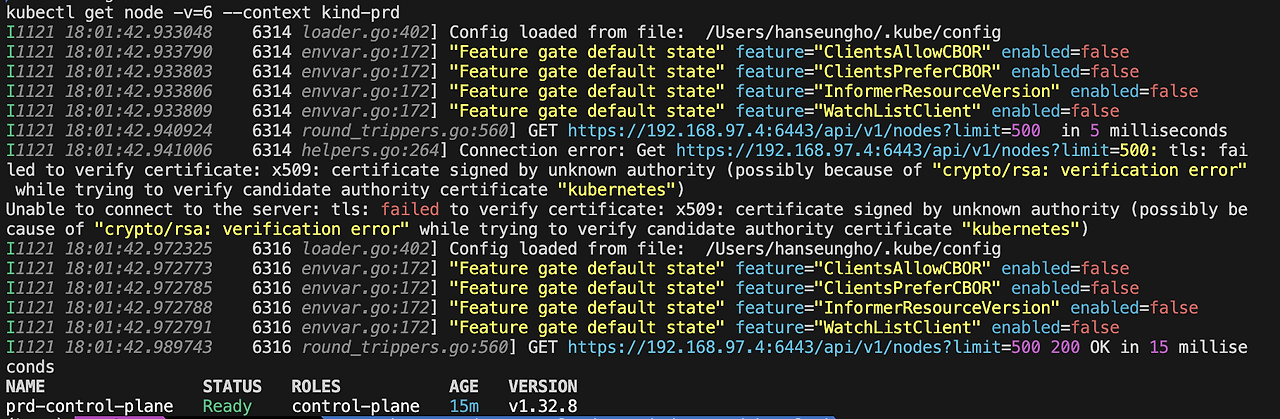
- ArgoCD(mgmt k8s) 에 dev/prd 클러스터 등록
# 자격 증명 확인
kubectl config get-contexts

# mgmt k8s 자격증명 변경
kubectl config use-context kind-mgmt

# 기본 cluster 확인
argocd cluster list
argocd cluster list -o json | jq

kubectl get secret -n argocd
kubectl get secret -n argocd argocd-secret -o jsonpath='{.data}' | jq

argocd cluster add kind-dev --name dev-k8s
{"level":"info","msg":"ServiceAccount \"argocd-manager\" created in namespace \"kube-system\"","time":"2025-11-21T18:12:48+09:00"}
{"level":"info","msg":"ClusterRole \"argocd-manager-role\" created","time":"2025-11-21T18:12:48+09:00"}
{"level":"info","msg":"ClusterRoleBinding \"argocd-manager-role-binding\" created","time":"2025-11-21T18:12:48+09:00"}
{"level":"info","msg":"Created bearer token secret \"argocd-manager-long-lived-token\" for ServiceAccount \"argocd-manager\"","time":"2025-11-21T18:12:48+09:00"}
Cluster 'https://192.168.97.3:6443' added


# dev 클러스터 접근 구성 확인
k8s2 get sa -n kube-system argocd-manager
kubectl rolesum -n kube-system argocd-manager --context kind-dev
---
ServiceAccount: kube-system/argocd-manager
Secrets:

Policies:
• [CRB] */argocd-manager-role-binding ⟶  [CR] */argocd-manager-role
  Resource  Name  Exclude  Verbs  G L W C U P D DC
  *.*       [*]     [-]     [-]   ✔ ✔ ✔ ✔ ✔ ✔ ✔ ✔


# prod 클러스터 등록
argocd cluster add kind-prd --name prd-k8s --yes


argocd cluster list
SERVER                          NAME        VERSION  STATUS      MESSAGE                                                  PROJECT
https://192.168.97.3:6443       dev-k8s              Unknown     Cluster has no applications and is not being monitored.
https://192.168.97.4:6443       prd-k8s     1.32     Successful
https://kubernetes.default.svc  in-cluster           Unknown     Cluster has no applications and is not being monitored.
ArgoCD를 통한 멀티클러스터 관리
App of Apps 패턴
여러 애플리케이션을 하나의 부모 App 묶어서 관리할 수 있는 패턴입니다.
ArgoCD가 애플리케이션 단위로 배포를 하기에 서비스가 많아짐에 따라 애플리케이션이 많아지고 관리 포인트도 많아집니다.
이를 애플리케이션 단위로 묶어서 사용하게 되면, 논리적으로 하나의 그룹처럼 관리할 수 있게 됩니다.
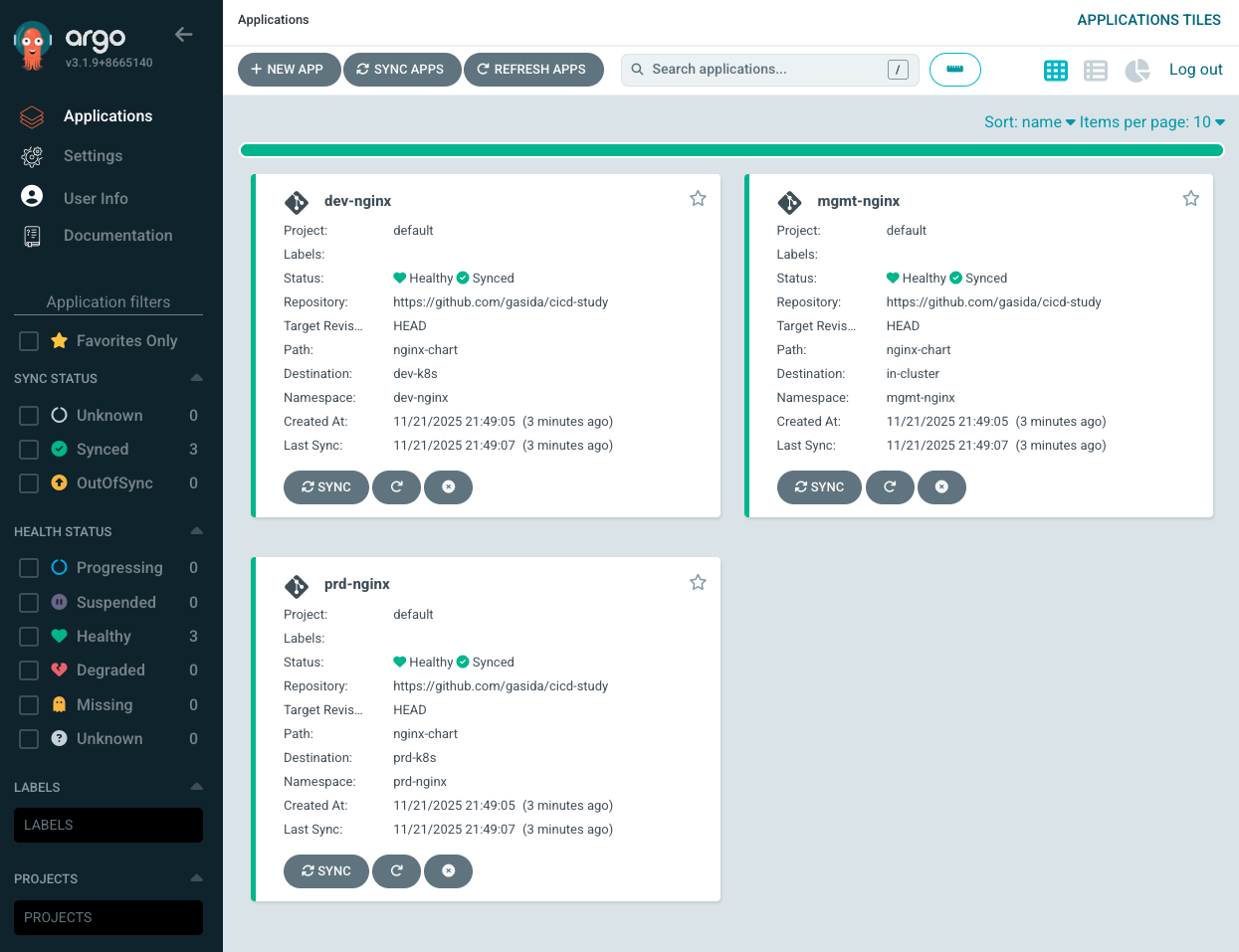
ArgoCD로 각 클러스터에 nginx 배포
- destionation으로 구별하여 배포
docker network inspect kind | grep -E 'Name|IPv4Address'

DEVK8SIP=192.168.97.3
PRDK8SIP=192.168.97.4

echo $DEVK8SIP $PRDK8SIP

# argocd app 배포
cat <https://github.com/gasida/cicd-study
    targetRevision: HEAD
  syncPolicy:
    automated:
      prune: true
    syncOptions:
    - CreateNamespace=true
  destination:
    namespace: mgmt-nginx
    server: https://kubernetes.default.svc
EOF

cat <https://github.com/gasida/cicd-study
    targetRevision: HEAD
  syncPolicy:
    automated:
      prune: true
    syncOptions:
    - CreateNamespace=true
  destination:
    namespace: dev-nginx
    server: https://$DEVK8SIP:6443
EOF

cat <https://github.com/gasida/cicd-study
    targetRevision: HEAD
  syncPolicy:
    automated:
      prune: true
    syncOptions:
    - CreateNamespace=true
  destination:
    namespace: prd-nginx
    server: https://$PRDK8SIP:6443
EOF

argocd app list
NAME               CLUSTER                         NAMESPACE   PROJECT  STATUS  HEALTH       SYNCPOLICY  CONDITIONS  REPO                                  PATH         TARGET
argocd/dev-nginx   https://192.168.97.3:6443       dev-nginx   default  Synced  Healthy      Auto-Prune        https://github.com/gasida/cicd-study  nginx-chart  HEAD
argocd/mgmt-nginx  https://kubernetes.default.svc  mgmt-nginx  default  Synced  Progressing  Auto-Prune        https://github.com/gasida/cicd-study  nginx-chart  HEAD
argocd/prd-nginx   https://192.168.97.4:6443       prd-nginx   default  Synced  Progressing  Auto-Prune        https://github.com/gasida/cicd-study  nginx-chart  HEAD

# mgmt 클러스터에서 application 확인
kubectl get applications -n argocd
NAME         SYNC STATUS   HEALTH STATUS
dev-nginx    Synced        Healthy
mgmt-nginx   Synced        Healthy
prd-nginx    Synced        Healthy

# 통신 확인
kubectl get pod,svc,ep,cm -n dev-nginx --context kind-dev
NAME                            READY   STATUS    RESTARTS   AGE
pod/dev-nginx-59f4c8899-9k6sx   1/1     Running   0          3m22s

NAME                TYPE       CLUSTER-IP      EXTERNAL-IP   PORT(S)        AGE
service/dev-nginx   NodePort   10.96.156.127           80:31000/TCP   3m22s

NAME                  ENDPOINTS       AGE
endpoints/dev-nginx   10.244.0.5:80   3m22s

curl -s http://127.0.0.1:31000
NAME                         DATA   AGE
configmap/dev-nginx          1      3m22s
configmap/kube-root-ca.crt   1      3m22s
Hello, Dev - Kubernetes!
Nginx version 1.26.1
# Argocd APP 삭제
App of Apps + Templating
기본 App of Apps 패턴은 yaml를 일일히 관리하기에 자동화가 어렵습니다.
이를 헬름 차트를 사용하면 values.yaml 값만 수정하면 되기에 일부 자동화가 가능해집니다.
예제 애플리케이션 차트를 확인하면 다음과 같습니다.
- 헬름 차트
# https://github.com/gasida/cicd-study/blob/main/apps/templates/applications.yaml
{{- range .Values.applications }}
{{- $config := $.Values.config -}}
apiVersion: argoproj.io/v1alpha1
kind: Application
metadata:
  name: {{ printf "example.%s" .name | quote }}
  namespace: argocd
  finalizers:
  - resources-finalizer.argocd.argoproj.io
spec:
  destination:
    namespace: {{ .namespace | default .name | quote }}
    server: {{ $config.spec.destination.server | quote }}
  project: default
  source:
    path: {{ .path | default .name | quote }}
    repoURL: {{ $config.spec.source.repoURL }}
    targetRevision: {{ $config.spec.source.targetRevision }}
    {{- with .tool }}
    {{- . | toYaml | nindent 4 }}
    {{- end }}
  syncPolicy:
    syncOptions:
      - CreateNamespace=true
    automated:
      prune: true
      selfHeal: true
---
{{ end -}}- 헬름 차트의 Values
# https://github.com/gasida/cicd-study/blob/main/apps/values.yaml
config:
  spec:
    destination:
      server: https://kubernetes.default.svc
    source:
      repoURL: https://github.com/gasida/cicd-study
      targetRevision: main

applications:
  - name: helm-guestbook
    tool:
      helm:
        releaseName: helm-guestbook
  - name: kustomize-guestbook
  - name: sync-waves
# Root Application 하나에 여러 Application manifest를 넣어 관리
argocd app create apps \
--dest-namespace argocd \
--dest-server https://kubernetes.default.svc \
--repo https://github.com/gasida/cicd-study.git \
--path apps
# Root Application을 sync하면 하위 앱들이 자동 생성됨
argocd app sync apps

# 삭제
argocd app delete argocd/apps --yes
App of Apps 의 한계
App of Apps 패턴은 관리해야 할 애플리케이션이나 클러스터가 늘어날수록 Root App의 YAML 파일이 기하급수적으로 비대해지고, 모든 변경 사항을 사람이 직접 수정해야 하는 병목 현상이 발생합니다.
- 앱 개수를 동적으로 생성할 수 없음
- Git 구조와 Application 구조 간 결합도가 높음
- 여러 클러스터 / 여러 namespace 자동 확장이 어려움
- Multi-tenant 구조에서 스케일링 문제가 발생
- 선언적(dynamic)이 아니라 정적(static)
ApplicationSet 컨트롤러 : ArgoCD CRD 를 통해 Application 관리
다수의 클러스터와 모노리포 내에서 Argo CD 애플리케이션을 관리하는 자동화와 유연성을 제공하며, 멀티테넌트 쿠버네티스 클러스터에서 셀프 서비스 사용을 가능하게 합니다
(Argo CD v2.3부터 ApplicationSet 컨트롤러가 Argo CD와 함께 제공)
- Argo CD를 사용하여 단일 Kubernetes 매니페스트를 사용하여 여러 Kubernetes 클러스터를 타겟팅하는 기능
- Argo CD를 사용하여 하나 이상의 Git 저장소에서 여러 애플리케이션을 배포하기 위해 단일 Kubernetes 매니페스트를 사용하는 기능
- 모노레포에 대한 지원 개선: Argo CD 컨텍스트에서 모노레포는 단일 Git 저장소 내에 정의된 여러 Argo CD 애플리케이션 리소스입니다.
- 다중 테넌트 클러스터 내에서 Argo CD를 사용하여 개별 클러스터 테넌트가 애플리케이션을 배포하는 기능을 향상시킵니다(대상 클러스터/네임스페이스를 활성화하는 데 권한이 있는 클러스터 관리자가 관여할 필요 없음)
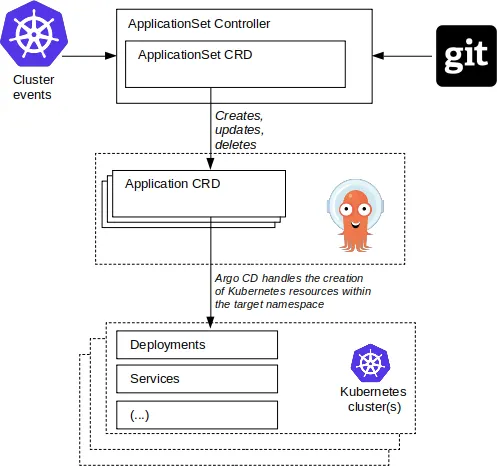
applicationSet 의 유일한 목표는 Argo CD 애플리케이션 리소스가 선언적 ApplicationSet 리소스에 정의된 상태로 보장되도록 하는 것이다.
- ApplicationSet은 제너레이터 generator 를 사용해 각기 다른 데이터 소스를 지원하는 매개변수를 생성한다. 제너레이터의 종류 - Generators
- 제너레이터 : ApplicationSet 의 기본 구성 요소는 제너레이터다. 제너레이터는 ApplicationSet 에서 사용되는 매개변수 생성을 담당한다.
제너레이터 예시
(1) 리스트 제너레이터
- 리스트를 통해 클러스터 대상을 정의할 수 있다.
apiVersion: argoproj.io/v1alpha1
kind: ApplicationSet
metadata:
  name: guestbook
  namespace: argocd
spec:
  goTemplate: true
  goTemplateOptions: ["missingkey=error"]
  generators:
  - list:
      elements:
      - cluster: engineering-dev
        url: https://1.2.3.4
      - cluster: engineering-staging
        url: https://2.4.6.8
      - cluster: engineering-prod
        url: https://9.8.7.6
  template:
    metadata:
      name: '{{.cluster}}-guestbook'
    spec:
      project: "my-project"
      source:
        repoURL: https://github.com/argoproj/argo-cd.git
        targetRevision: HEAD
        path: applicationset/examples/list-generator/guestbook/{{.cluster}}
      destination:
        server: '{{.url}}'
        namespace: guestbook
(2) 클러스터 제너레이터
- 모든 클러스터의 경우
apiVersion: argoproj.io/v1alpha1
kind: ApplicationSet
metadata:
  name: guestbook
  namespace: argocd
spec:
  goTemplate: true
  goTemplateOptions: ["missingkey=error"]
  generators:
  - clusters: {} # Automatically use all clusters defined within Argo CD
  template:
    metadata:
      name: '{{.name}}-guestbook' # 'name' field of the Secret
    spec:
      project: "my-project"
      source:
        repoURL: https://github.com/argoproj/argocd-example-apps/
        targetRevision: HEAD
        path: guestbook
      destination:
        server: '{{.server}}' # 'server' field of the secret
namespace: guestbook- 레이블 셀렉터와 일치하는 클러스터 대상
# This would match an Argo CD cluster secret containing:
apiVersion: v1
kind: Secret
data:
  # (... fields as above ...)
metadata:
  labels:
    argocd.argoproj.io/secret-type: cluster
    staging: "true"
...

# A label selector may be used to narrow the scope of targeted clusters to only those matching a specific label:
apiVersion: argoproj.io/v1alpha1
kind: ApplicationSet
metadata:
  name: guestbook
  namespace: argocd
spec:
  goTemplate: true
  goTemplateOptions: ["missingkey=error"]
  generators:
  - clusters:
      selector:
        matchLabels:
          staging: "true"
        # The cluster generator also supports matchExpressions.
        #matchExpressions:
        #  - key: staging
        #    operator: In
        #    values:
        #      - "true"
...
ApplicationSet List 제너레이터 실습
docker network inspect kind | grep -E 'Name|IPv4Address'

DEVK8SIP=192.168.97.3
PRDK8SIP=192.168.97.4
echo $DEVK8SIP $PRDK8SIP

# argocd app 배포
cat <https://github.com/gasida/cicd-study.git
        targetRevision: HEAD
        path: appset/list/{{.cluster}}
      destination:
        server: '{{.url}}'
        namespace: guestbook
      syncPolicy:
        syncOptions:
          - CreateNamespace=true
EOF


kubectl get applicationsets -n argocd
NAME        AGE
guestbook   20s

argocd appset list
NAME              PROJECT  SYNCPOLICY  CONDITIONS                                                                                                                                                                                                                                     REPO                                      PATH                      TARGET
argocd/guestbook  default  nil         [{ParametersGenerated Successfully generated parameters for all Applications 2025-11-21 22:22:52 +0900 KST True ParametersGenerated} {ResourcesUpToDate ApplicationSet up to date 2025-11-21 22:22:52 +0900 KST True ApplicationSetUpToDate}]  https://github.com/gasida/cicd-study.git  appset/list/{{.cluster}}  HEAD

argocd app list -l managed-by=applicationset
NAME                      CLUSTER                    NAMESPACE  PROJECT  STATUS     HEALTH   SYNCPOLICY  CONDITIONS  REPO                                      PATH                 TARGET
argocd/dev-k8s-guestbook  https://192.168.97.3:6443  guestbook  default  OutOfSync  Missing  Manual            https://github.com/gasida/cicd-study.git  appset/list/dev-k8s  HEAD
argocd/prd-k8s-guestbook  https://192.168.97.4:6443  guestbook  default  OutOfSync  Missing  Manual            https://github.com/gasida/cicd-study.git  appset/list/prd-k8s  HEAD

# sync
argocd app sync -l managed-by=applicationset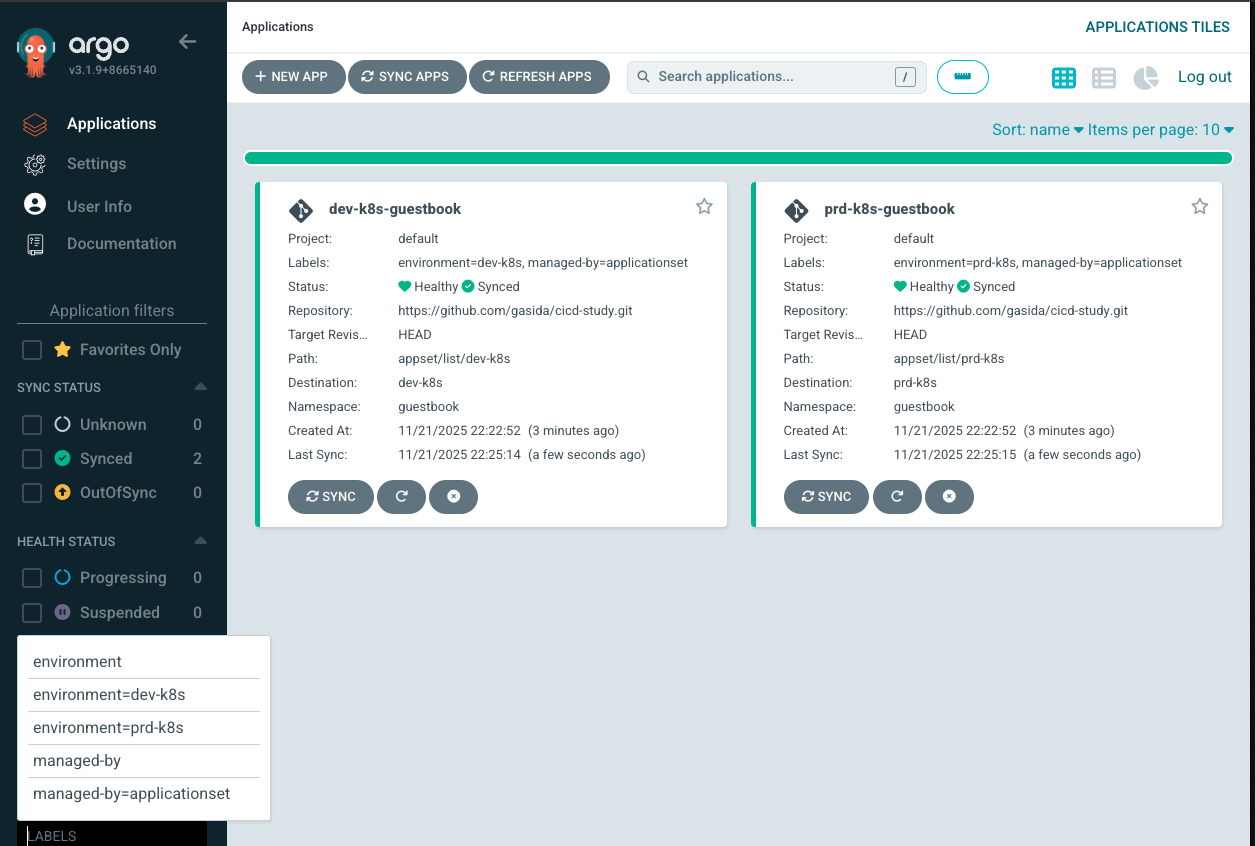
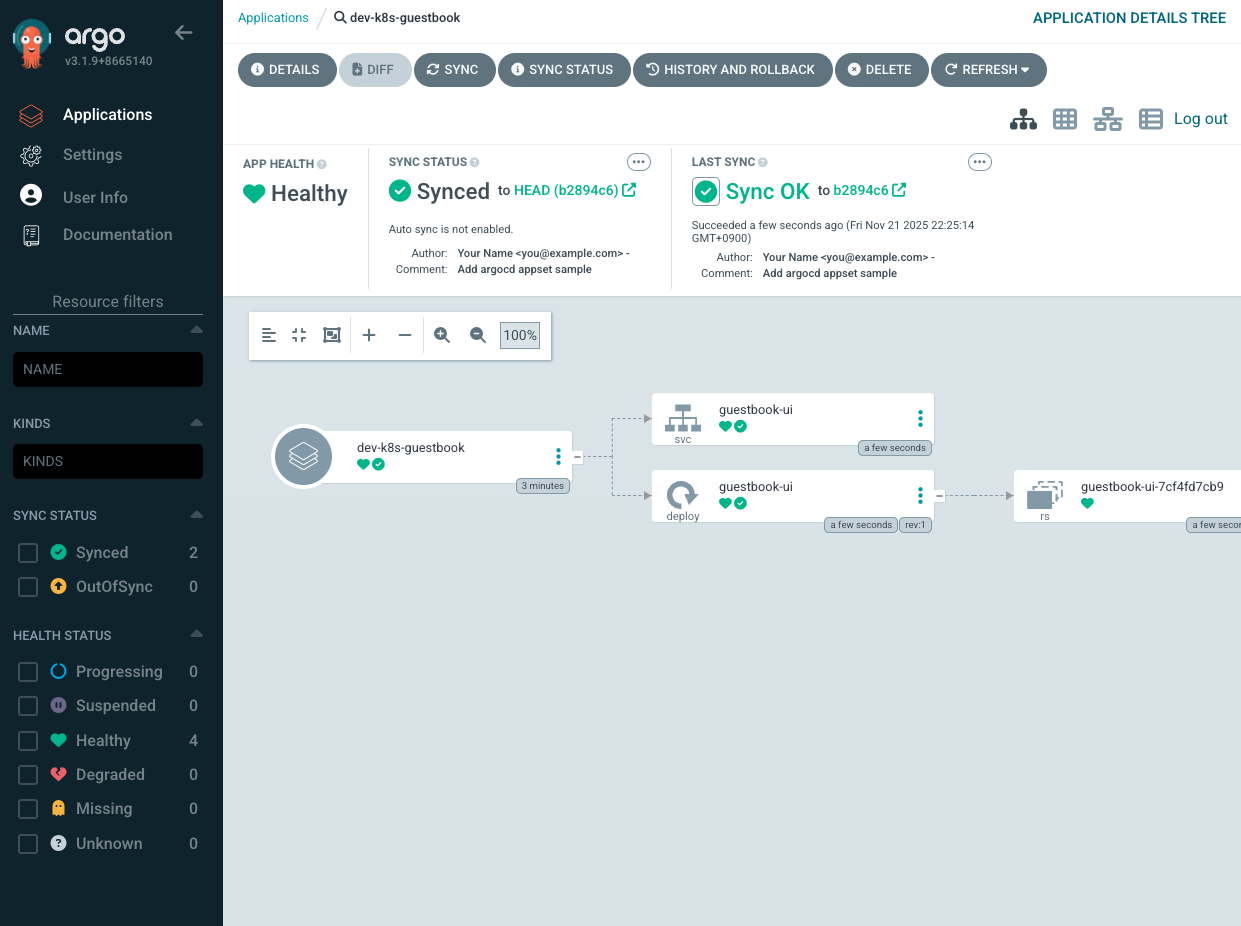
구성 환경 삭제
kind delete clsuters mgmt dev prd'Cloud' 카테고리의 다른 글
| HashiCorp Vault 맛보기 (0) | 2025.11.29 |
|---|---|
| KeyCloak SSO 실습 (0) | 2025.11.23 |
| ArgoCD 접근제어 설정 방법 (0) | 2025.11.16 |
| ArgoCD 정리 (1) (0) | 2025.11.08 |
| Gitops CI & CD 구성(Jenkins & ArgoCD) (0) | 2025.11.02 |