개요
AI 의 발전에 따라 Observability(가시성) 패러다임이 진화하고 있다.
현재까지 Observability를 기반으로 장애 발생 이후 대응하는 Reactive 방식이 중심이었다면,
이제는 AI와 결합되어 이상 징후를 사전에 감지하고 자동으로 대응하는 Proactive Action 으로 확장되고 있다.
이번 글에서는 Proactive Action 의 원리를 이해하기 위해 자동화된 SRE 사고 대응 시스템(SRE Incident Response Agent) 을 실습하고, 개선할 점을 찾아 개발한 내용을 공유한다.
SRE Incident Response Agent
samples/python/04-industry-use-cases/software-engineering/sre-incident-response-agent at main · strands-agents/samples
Agent samples built using the Strands Agents SDK. Contribute to strands-agents/samples development by creating an account on GitHub.
github.com
Amazon CloudWatch 알람을 감지하고, AI 기반 근본 원인 분석을 수행하며, Kubernetes/Helm 문제 해결 조치를 적용하고, 구조화된 사고 보고서를 Slack에 게시하는 자동화된 SRE 사고 대응 시스템이다.
필자가 밀고 있는 Stradns Agent를 통해 다중 에이전트를 통해 동작하며 각 에이전트가 필요한 데이터를 기반으로 분석 & 추천 보고서를 제공한다.
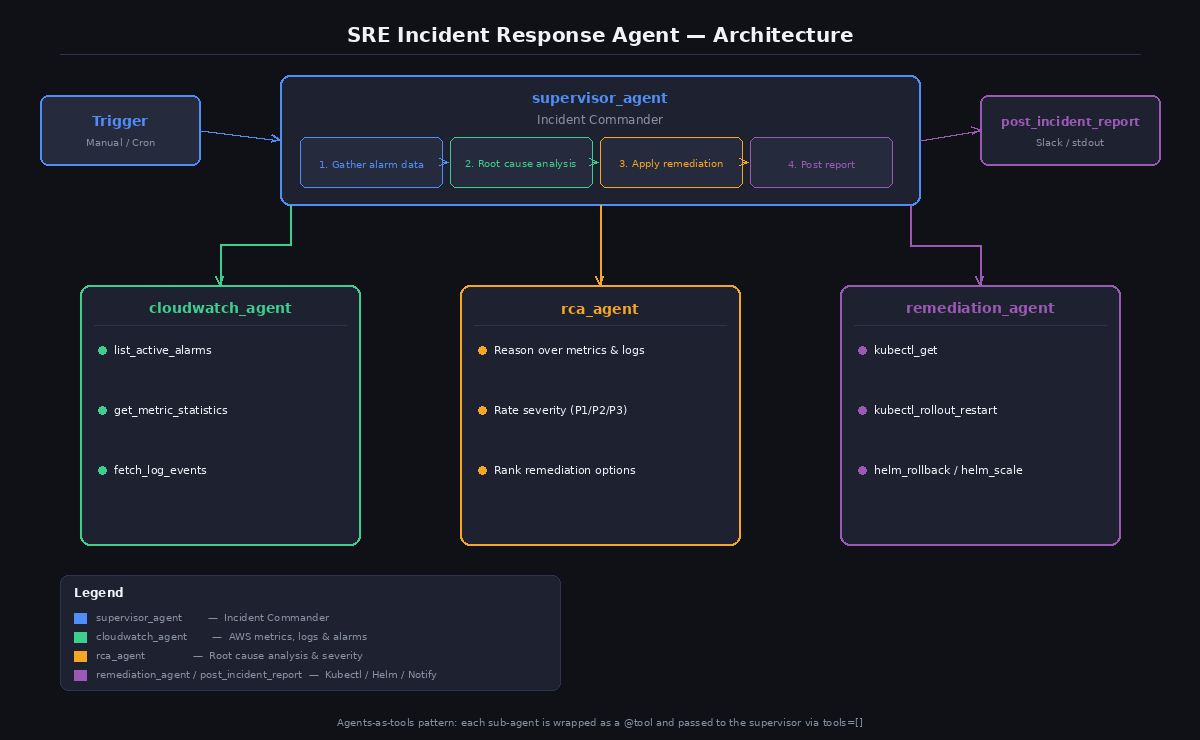
- Supervisor_agent (감독 에이전트) 의 관리 하에 Cloudwatch agent(알람, 메트릭, 로그 수집), rca agent(분석), remediation agent(교정) 이 순차적으로 실행되며 보고서를 작성한다.
필요 권한
에이전트를 실행하기 위해 IAM, K8S 권한이 필요하다.
권한을 확인하면 읽기&확인 용도로 최소한의 권한이 부여된 것을 확인할 수 있다.
1.필요 IAM 권한
{
  "Version": "2012-10-17",
  "Statement": [
    {
      "Effect": "Allow",
      "Action": [
        "cloudwatch:DescribeAlarms",
        "cloudwatch:GetMetricStatistics",
        "logs:FilterLogEvents",
        "logs:DescribeLogGroups"
      ],
      "Resource": "*"
    }
  ]
}
2.K8S RBAC 권한
apiVersion: rbac.authorization.k8s.io/v1
kind: Role
metadata:
  name: sre-agent
  namespace: <target-namespace>
rules:
  - apiGroups: ["apps"]
    resources: ["deployments"]
    verbs: ["get", "list", "patch", "update"]
  - apiGroups: ["apps"]
    resources: ["replicasets"]
    verbs: ["get", "list", "watch"]
  - apiGroups: [""]
    resources: ["pods"]
    verbs: ["get", "list"]
  - apiGroups: ["autoscaling"]
    resources: ["horizontalpodautoscalers"]
    verbs: ["get", "list"]
  # Required by Helm to read and write release history
  - apiGroups: [""]
    resources: ["secrets", "configmaps"]
    verbs: ["get", "list", "create", "update", "delete"]
데모
cp .env.example .env

vi .env

# AWS Configuration
AWS_REGION=ap-northeast-2

# Amazon Bedrock Model ID (Claude Sonnet 4 default)
BEDROCK_MODEL_ID=global.anthropic.claude-sonnet-4-5-20250929-v1:0

# Set to false only when you want LIVE kubectl/helm commands to execute.
# In dry-run mode, all remediation commands are printed but not executed.
DRY_RUN=false

# Optional: Slack Incoming Webhook URL for posting incident reports.
# Leave blank to print the report to stdout instead.
SLACK_WEBHOOK_URL=- SLACK_WEBHOOK_URL 은 슬랙 채널 설정 > 통합 > 앱 : 앱 추가 > Incoming WebHook 추가하면 확인할 수 있다.
- BEDROCK_MODEL_ID : global.anthropic.claude-sonnet-4-5-20250929-v1:0 로 변경해야 한다.
# 가상화 구성
python -m venv venv
source venv/bin/activate

# 필요 패키지 설치
pip install -r requirements.txt

# 패키지
python sre_agent.py
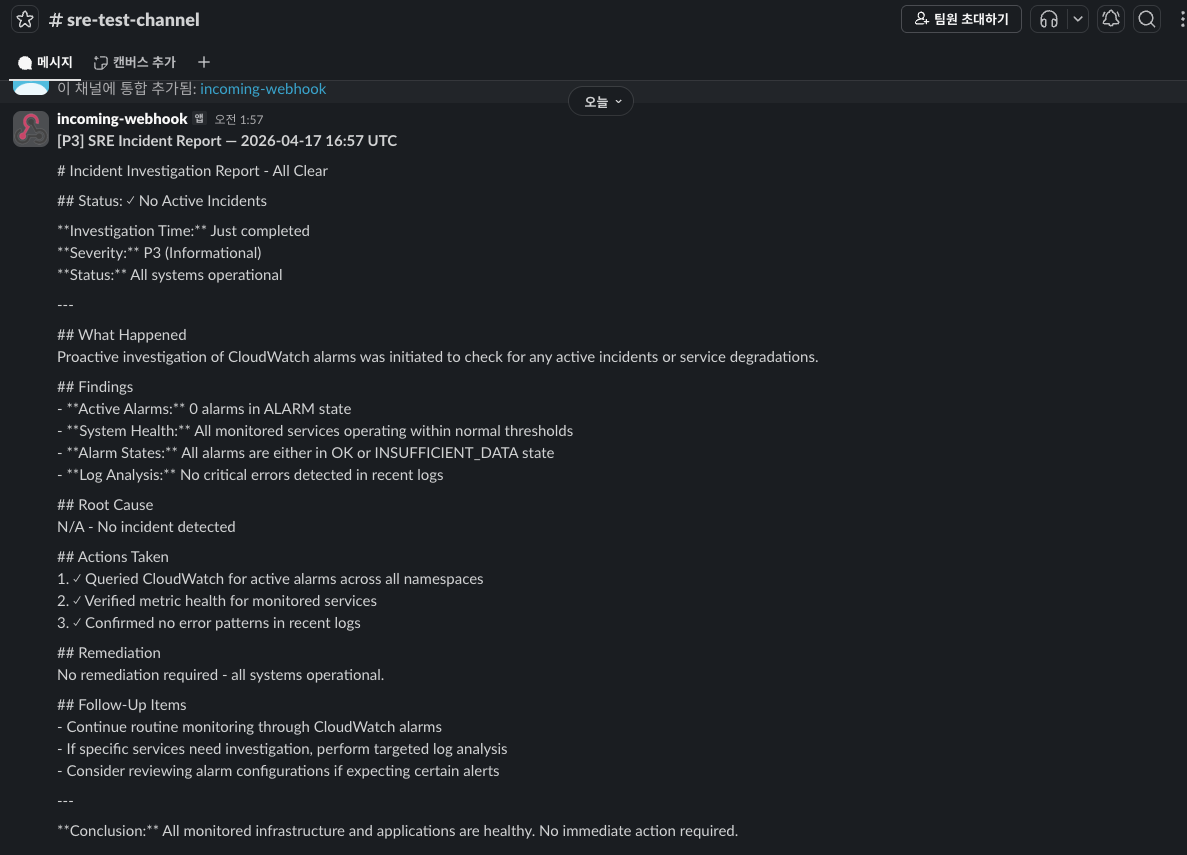
→ 정상적으로 확인된다.
구성 확인
에이전트와 사용 Tool 구조는 다음과 같이 구성되어 있다.
SRE Incident Response System
│
└── supervisor_agent (Incident Commander)
    │
    ├── Tool: cloudwatch_agent
    │   └── _cloudwatch_agent (CloudWatch Monitoring Specialist)
    │       ├── Tool: list_active_alarms
    │       ├── Tool: get_metric_statistics
    │       └── Tool: fetch_log_events
    │
    ├── Tool: rca_agent
    │   └── _rca_agent (Root Cause Analysis Specialist)
    │       └── (no tools - pure reasoning)
    │
    ├── Tool: remediation_agent
    │   └── _remediation_agent (Kubernetes/Helm Operations Expert)
    │       ├── Tool: kubectl_get
    │       ├── Tool: kubectl_rollout_restart
    │       ├── Tool: helm_rollback
    │       └── Tool: helm_scale
    │
    └── Tool: post_incident_report
Strands Agent 구성된 에이전트인 만큼 이해가 쉽다.
각 에이전트에 사용할 모델과 프롬프트, 사용할 도구가 정의되어 있다.
사용할 도구는 재귀적으로 사용할 수 있다.
관리자 에이전트 도구에 서브 에이전트가 정의되어 있으며, 서브 에이전트에 각 도구가 사용된다.
# 관리자 에이전트
supervisor_agent = Agent(
model=model,
system_prompt="""You are the SRE Incident Commander orchestrating an incident response.
Follow this workflow:
1. Call cloudwatch_agent to gather all alarm and metric data.
2. Call rca_agent with the gathered data to perform root cause analysis.
3. Call remediation_agent with the RCA findings to inspect workloads and apply a fix.
4. Synthesise findings into a final incident report and post it using the
post_incident_report tool.
Be decisive. Keep the report concise but complete: include
- What happened (alarm triggered, metric values)
- Why it happened (root cause)
- What was done (remediation action)
- What to watch next (follow-up items)
""",
tools=[cloudwatch_agent, rca_agent, remediation_agent, post_incident_report],
)
# 서브 에이전트
_cloudwatch_agent = Agent(
model=model,
system_prompt="""You are a CloudWatch Monitoring specialist.
Your job is to:
1. List any active alarms.
2. Fetch the relevant metric statistics for the alarms you find.
3. Pull recent error log events from the associated log group.
4. Return a concise, structured summary of what the data shows.
Always include timestamps and specific metric values in your summary.
""",
tools=[list_active_alarms, get_metric_statistics, fetch_log_events],
)
# 서브 에이전트
_rca_agent = Agent(
model=model,
system_prompt="""You are a senior Site Reliability Engineer performing root cause analysis.
Given alarm data, metrics, and log snippets, your job is to:
1. Identify the most likely root cause(s).
2. Assess the blast radius (which services/users are affected).
3. Rate the severity (P1 critical / P2 high / P3 medium).
4. Propose 2-3 concrete remediation options ranked by risk.
Be precise. Use technical language. Cite specific metric values and log lines.
""",
tools=[],
)
# 서브 에이전트
_remediation_agent = Agent(
model=model,
system_prompt="""You are a Kubernetes and Helm operations expert.
Given a root cause analysis, your job is to:
1. Inspect the current state of affected workloads with kubectl.
2. Propose and execute the safest remediation action (rollback, restart, scale).
3. Always prefer reversible actions (rollback > restart > scale).
4. Confirm the action taken or explain why no action was taken.
In DRY_RUN mode, commands are simulated and safe to run.
""",
tools=[kubectl_get, kubectl_rollout_restart, helm_rollback, helm_scale],
)
사용된 도구는 다음과 같이 표로 정리하였다. (ChatGPT 부분참고)
1. CloudWatch 모니터링 도구 (CloudWatch Agent 전용)
|
도구명
|
파라미터
|
설명
|
반환값
|
|
list_active_alarms
|
namespace (optional)
|
ALARM 상태의 CloudWatch 알람 목록 조회
|
JSON: 알람명, 네임스페이스, 메트릭, 임계값, 상태 이유
|
|
get_metric_statistics
|
namespace, metric_name, dimensions, period_minutes
|
지정된 기간의 메트릭 통계 조회
|
JSON: 타임스탬프별 평균/합계/최대값 데이터포인트
|
|
fetch_log_events
|
log_group, filter_pattern, minutes_back, max_events
|
필터 패턴과 일치하는 최근 로그 이벤트 조회
|
JSON: 타임스탬프, 메시지, 스트림명
|
2. Kubernetes / Helm 운영 도구 (Remediation Agent 전용)
|
도구명
|
파라미터
|
설명
|
DRY_RUN 동작
|
|
kubectl_get
|
resource_type, namespace
|
Kubernetes 리소스 상태 조회
|
시뮬레이션된 출력 반환
|
|
kubectl_rollout_restart
|
deployment, namespace
|
디플로이먼트 롤링 재시작
|
명령어만 출력 (실행 안 함)
|
|
helm_rollback
|
release, revision, namespace
|
Helm 릴리스를 이전 버전으로 롤백
|
명령어만 출력 (실행 안 함)
|
|
helm_scale
|
release, replicas, namespace
|
디플로이먼트 레플리카 수 조정
|
명령어만 출력 (실행 안 함)
|
3. 알림 도구 (Supervisor Agent 전용)
|
도구명
|
파라미터
|
설명
|
동작
|
|
post_incident_report
|
summary, severity
|
인시던트 리포트 발송
|
SLACK_WEBHOOK_URL 설정 시 Slack 전송, 미설정 시 stdout 출력
|
→ 분석 역할을 담당하는 RCA 에이전트가 사용하는 도구가 없다. 프롬프트만 정의되어 있는데, 추후 확장하여 사용할 수 있을 여지가 있다.
확장
운영 환경에 위 프로젝트를 적용하기에는 개선항목이 많다.
- 플랫폼화 서비스 제공 : 바이브코딩을 통해 지시하여 개발
- Cloudwatch 알람 설정 자동화 및 메트릭 수집 최적화
Cloudwatch 알람 식별 및 자동화
알람 식별과 메트릭 & 로그 수집 데이터 고도화를 위해 Cloudwatch 에이전트를 하겠다.
AWS Cloudwatch MCP Server를 에이전트 사용 도구로 결합하고, 확인하겠다.
mcp/src/cloudwatch-mcp-server at main · awslabs/mcp
Official MCP Servers for AWS. Contribute to awslabs/mcp development by creating an account on GitHub.
github.com
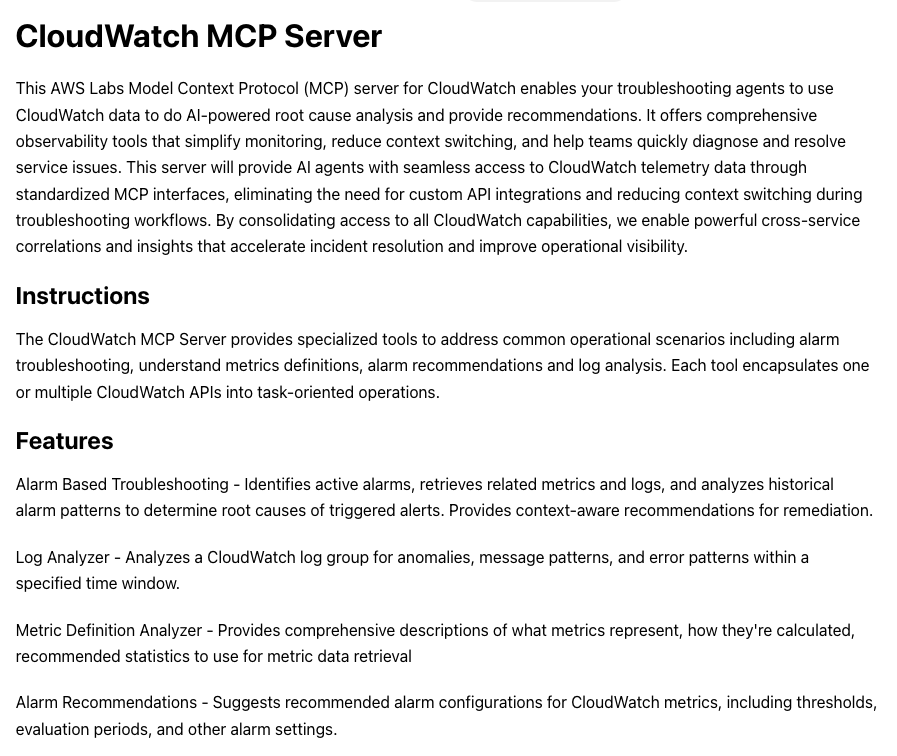
Cloudwatch MCP 서버가 제공하는 도구는 다음과 같다.
Tools for CloudWatch Metrics
- get_metric_data - Retrieves detailed CloudWatch metric data for any CloudWatch metric. Use this for general CloudWatch metrics that aren't specific to Application Signals. Provides ability to query any metric namespace, dimension, and statistic
- get_metric_metadata - Retrieves comprehensive metadata about a specific CloudWatch metric
- get_recommended_metric_alarms - Gets recommended alarms for a CloudWatch metric based on best practice, and trend, seasonality and statistical analysis.
- analyze_metric - Analyzes CloudWatch metric data to determine trend, seasonality, and statistical properties
Tools for CloudWatch Alarms
- get_active_alarms - Identifies currently active CloudWatch alarms across the account
- get_alarm_history - Retrieves historical state changes and patterns for a given CloudWatch alarm
Tools for CloudWatch Logs
- describe_log_groups - Finds metadata about CloudWatch log groups
- analyze_log_group - Analyzes CloudWatch logs for anomalies, message patterns, and error patterns
- execute_log_insights_query - Executes CloudWatch Logs insights query on CloudWatch log group(s) with specified time range and query syntax, returns a unique ID used to retrieve results
- get_logs_insight_query_results - Retrieves the results of an executed CloudWatch insights query using the query ID. It is used after execute_log_insights_query has been called
- cancel_logs_insight_query - Cancels in progress CloudWatch logs insights query
Required IAM Permissions
- cloudwatch:DescribeAlarms
- cloudwatch:DescribeAlarmHistory
- cloudwatch:GetMetricData
- cloudwatch:ListMetrics
- logs:DescribeLogGroups
- logs:DescribeQueryDefinitions
- logs:ListLogAnomalyDetectors
- logs:ListAnomalies
- logs:StartQuery
- logs:GetQueryResults
- logs:StopQuery
눈여겨볼 도구는 get_recommended_metric_alarms 이다.
추천 메트릭은 플레이북 형태로 제공되며, 알람 항목에 없는 것들은 계절성 기준 Anomaly Detection 을 통해 추가된다.
플레이북은 다음의 경로에서 확인할 수 있으며, EKS 플레이북 형태의 알람은 다음과 같다.
- src/cloudwatch-mcp-server/awslabs/cloudwatch_mcp_server/cloudwatch_metrics/data/metric_metadata.json
[
{
"description": "The number of total attempts by the scheduler to schedule Pods in the cluster for a given period. This metric helps monitor the scheduler\u2019s workload and can indicate scheduling pressure or potential issues with Pod placement.",
"metricId": {
"metricName": "scheduler_schedule_attempts_total",
"namespace": "AWS/EKS"
},
"recommendedStatistics": "Sum",
"unitInfo": "Count"
},
{
"description": "The number of successful attempts by the scheduler to schedule Pods to nodes in the cluster for a given period.",
"metricId": {
"metricName": "scheduler_schedule_attempts_SCHEDULED",
"namespace": "AWS/EKS"
},
"recommendedStatistics": "Sum",
"unitInfo": "Count"
},
{
"description": "The number of attempts to schedule Pods that were unschedulable for a given period due to valid constraints, such as insufficient CPU or memory on a node.",
"metricId": {
"metricName": "scheduler_schedule_attempts_UNSCHEDULABLE",
"namespace": "AWS/EKS"
},
"recommendedStatistics": "Sum",
"unitInfo": "Count"
},
{
"description": "The number of attempts to schedule Pods that failed for a given period due to an internal problem with the scheduler itself, such as API Server connectivity issues.",
"metricId": {
"metricName": "scheduler_schedule_attempts_ERROR",
"namespace": "AWS/EKS"
},
"recommendedStatistics": "Sum",
"unitInfo": "Count"
},
{
"description": "The number of total pending Pods to be scheduled by the scheduler in the cluster for a given period.",
"metricId": {
"metricName": "scheduler_pending_pods",
"namespace": "AWS/EKS"
},
"recommendedStatistics": "Sum",
"unitInfo": "Count"
},
{
"description": "The number of pending Pods in activeQ, that are waiting to be scheduled in the cluster for a given period.",
"metricId": {
"metricName": "scheduler_pending_pods_ACTIVEQ",
"namespace": "AWS/EKS"
},
"recommendedStatistics": "Sum",
"unitInfo": "Count"
},
{
"description": "The number of pending Pods that the scheduler attempted to schedule and failed, and are kept in an unschedulable state for retry.",
"metricId": {
"metricName": "scheduler_pending_pods_UNSCHEDULABLE",
"namespace": "AWS/EKS"
},
"recommendedStatistics": "Sum",
"unitInfo": "Count"
},
{
"description": "The number of pending Pods in `backoffQ` in a backoff state that are waiting for their backoff period to expire.",
"metricId": {
"metricName": "scheduler_pending_pods_BACKOFF",
"namespace": "AWS/EKS"
},
"recommendedStatistics": "Sum",
"unitInfo": "Count"
},
{
"description": "The number of pending Pods that are currently waiting in a gated state as they cannot be scheduled until they meet required conditions.",
"metricId": {
"metricName": "scheduler_pending_pods_GATED",
"namespace": "AWS/EKS"
},
"recommendedStatistics": "Sum",
"unitInfo": "Count"
},
...
알람 플레이북 자원 대상은 다음과 같이 확인하였다.
jq -r '.[].metricId.namespace' metric_metadata.json | sort | uniq
====
AWS/ApiGateway
AWS/AutoScaling
AWS/CertificateManager
AWS/CloudFront
AWS/Cognito
AWS/DynamoDB
AWS/EBS
AWS/EC2
AWS/EC2Spot
AWS/ECS
AWS/ECS/ManagedScaling
AWS/EFS
AWS/EKS
AWS/ElastiCache
AWS/Kinesis
AWS/Lambda
AWS/NATGateway
AWS/PrivateLinkEndpoints
AWS/PrivateLinkServices
AWS/Prometheus
AWS/RDS
AWS/Redshift
AWS/Redshift-Serverless
AWS/Route53
AWS/Route53RecoveryReadiness
AWS/Route53Resolver
AWS/S3
AWS/S3ObjectLambda
AWS/SNS
AWS/SQS
AWS/Scheduler
AWS/TransitGateway
AWS/VPN
AWS/WorkSpaces
CWAgent
ContainerInsights
ECS/ContainerInsights
LambdaInsights
위 MCP 서버를 CloudWatch Agent 도구에 추가하였고 실행하였는데,
결과가 JSON 형태이며, 원치 않는 내용이 반환된다.
# JSON 결과 일부
## 📋 **Complete Alarm Inventory**
### **Summary by Priority:**
| Priority | Alarm Type | Count | Estimated Setup Time |
|----------|-----------|-------|---------------------|
| **P1 - Critical** | Lambda Errors | 12 | 30 min |
| **P1 - Critical** | Lambda Throttles | 12 | 30 min |
| **P1 - Critical** | EC2 Status Checks | 3 | 15 min |
| **P1 - Critical** | SQS Message Age | 1 | 10 min |
| **P2 - High** | Lambda Duration | 12 | 1 hour (after baseline) |
| **P2 - High** | EC2 CPU Utilization | 3 | 15 min |
| **P2 - High** | API Gateway Errors | 1 | 10 min |
| **P2 - High** | API Gateway Latency | 1 | 10 min |
| **P3 - Medium** | CloudFront Errors | 2 | 15 min |
| **P3 - Medium** | EBS Performance | 7 | 30 min |
| **P3 - Medium** | EC2 Memory (CWAgent) | 3 | 1 hour |
| **P3 - Medium** | EC2 Disk (CWAgent) | 3 | 1 hour |
| **Total** | | **60** | **~6 hours** |
---
## 🎯 **Recommended Action Plan**
### **Phase 1: Immediate (Next 24 Hours)**
1. ✅ Create SNS topic for critical alerts
2. ✅ Deploy P1 alarms via CloudFormation (Lambda Errors, Throttles, EC2 Status, SQS Age)
3. ✅ Test alarm notifications
4. ✅ Document runbook for each alarm type
**Expected Impact:** Cover 95% of critical failure scenarios
### **Phase 2: Short-Term (48 Hours)**
1. Deploy P2 alarms (CPU, API Gateway, Lambda Duration baseline)
2. Install CloudWatch Agent on EC2 instances
3. Set up EventBridge automation for incident response
4. Create alarm dashboard
**Expected Impact:** Complete operational visibility
### **Phase 3: Optimization (1 Week)**
1. Analyze 7 days of metrics data
2. Tune thresholds based on actual patterns
3. Deploy P3 alarms (CloudFront, EBS)
4. Implement composite alarms for complex scenarios
5. Set up alarm suppression during maintenance windows
**Expected Impact:** Reduce false positives, optimize alert fatigue
---
## 📊 **Cost Estimate**
### **CloudWatch Costs:**
- **Standard Alarms:** First 10 free, then $0.10/alarm/month
- 60 alarms = (60 - 10) × $0.10 = **$5.00/month**
- **High-Resolution Alarms:** $0.30/alarm/month (if using < 60 sec periods)
- **CloudWatch Agent Metrics:** First 10,000 custom metrics free
- 3 EC2 instances × 10 metrics = 30 metrics = **FREE**
- **GetMetricData API:** $0.01 per 1,000 requests
- Estimated: **< $1.00/month**
...
이에 필자는 추가 지시문을 통해 에이전트 워크플로우를 새로 구성하였다.
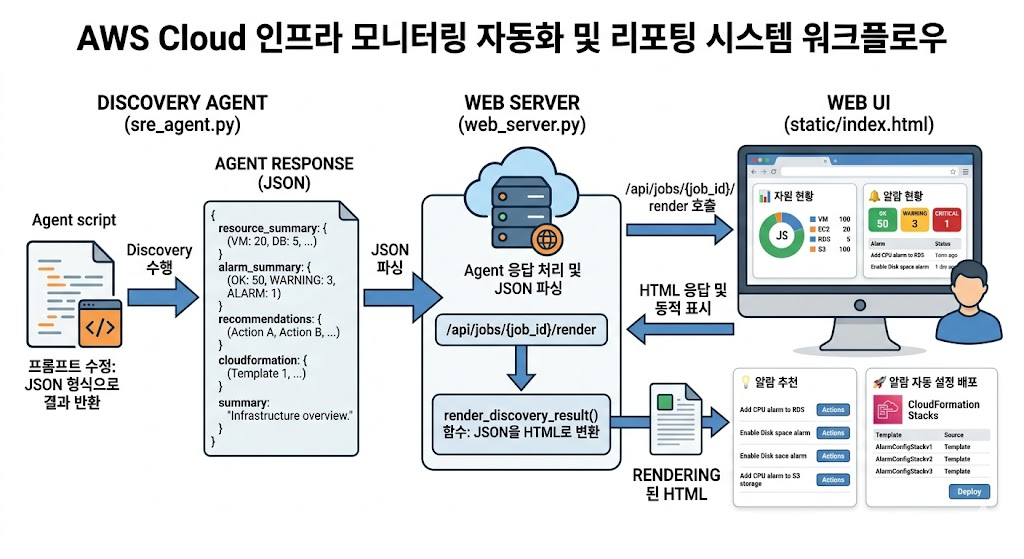
1. Discovery Agent (sre_agent.py)
- 프롬프트 수정: LLM 응답을 엄격한 JSON 형식으로 반환하도록 가이드라인 업데이트
- 출력 데이터 구조 :
- resource_summary: 전체 자원 현황 데이터
- alarm_summary: 현재 활성화된 알람 요약
- recommendations: 추가 필요한 알람 정책 추천
- cloudformation: 자동 배포를 위한 IaC 템플릿
- summary: 인프라 상태에 대한 전체적인 요약 텍스트
2. 웹 서버 (web_server.py)
- JSON 파싱: Agent로부터 전달받은 JSON 데이터를 파이썬 딕셔너리로 변환 및 예외 처리
- 신규 엔드포인트: /api/jobs/{job_id}/render 추가
- 렌더링 로직: render_discovery_result() 함수 구현
- JSON 데이터를 받아 Jinja2 템플릿 또는 HTML 스트링으로 변환
- 리포트 구성 (4개 섹션):
- 자원 현황: 주요 리소스 인벤토리 리스트
- 알람 현황: 현재 발생 중이거나 설정된 알람 상태
- 알람 추천: AI가 분석한 최적의 임계치 및 신규 알람 제안
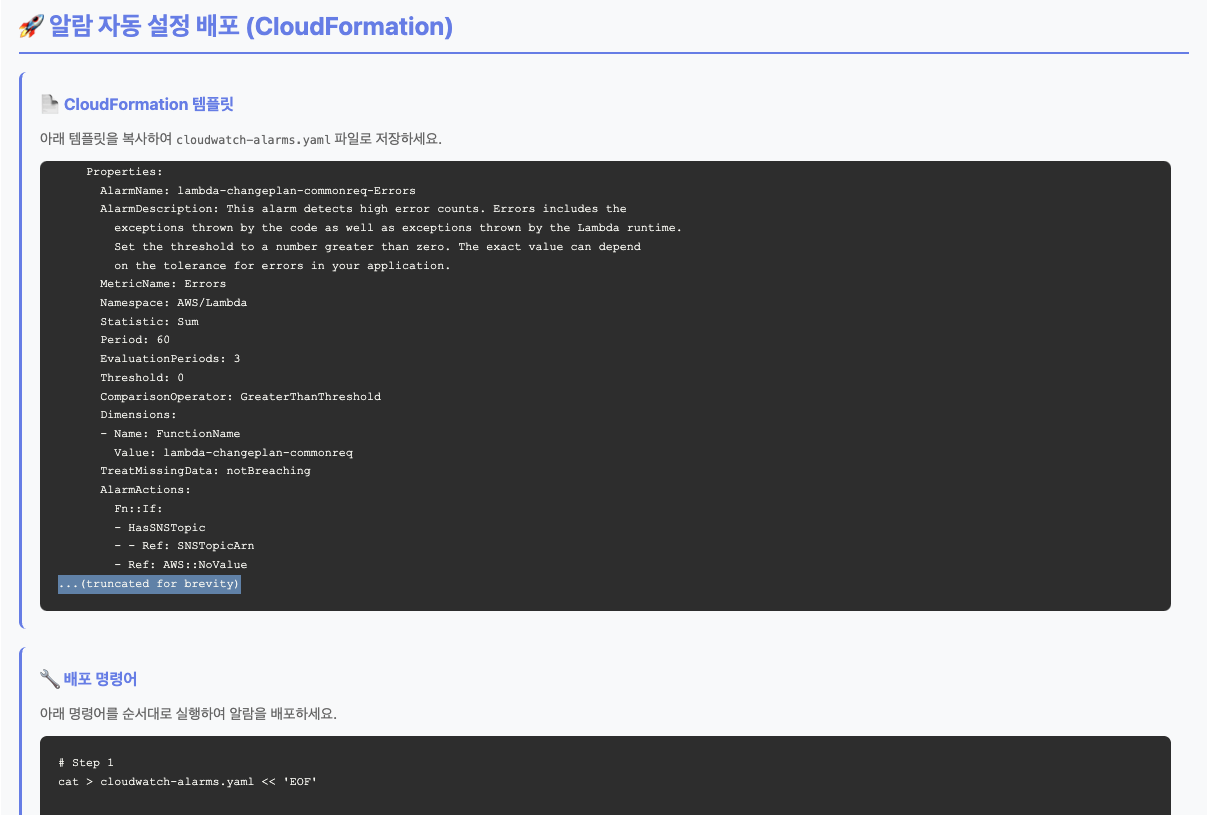
- 알람 자동 설정 배포: CloudFormation을 통한 즉시 배포 기능
3. 웹 UI (static/index.html)
- 동적 호출: 백엔드 작업 완료 시 /api/jobs/{job_id}/render API를 호출하여 결과 수신
- DOM 업데이트: 수신된 HTML 조각을 특정 컨테이너에 동적으로 삽입
- 시각화 요소:
- Card: 섹션별 구분
- Table: 자원 및 알람 리스트 정렬
- Badge: 상태(Critical, Warning, OK) 표시
데모 결과
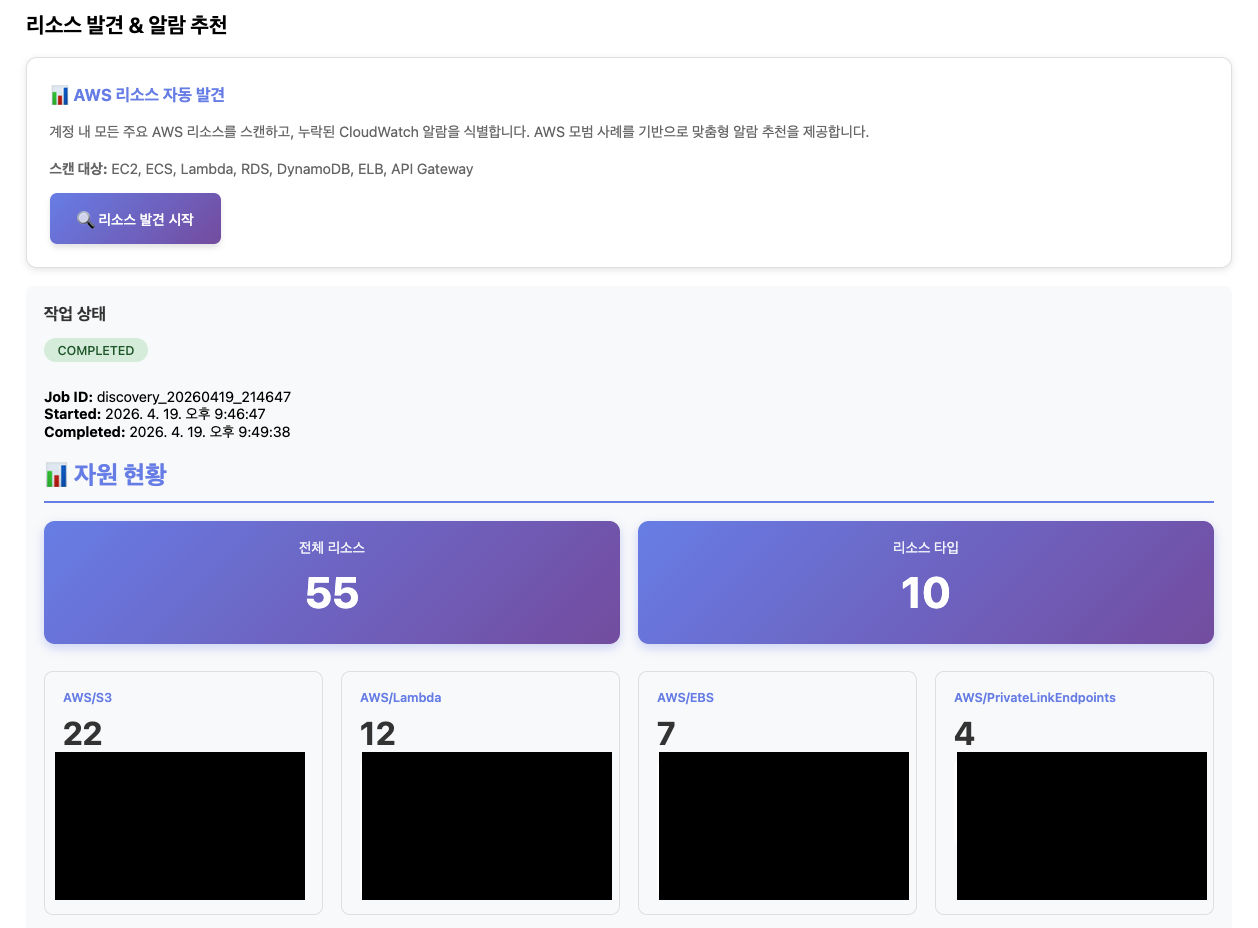
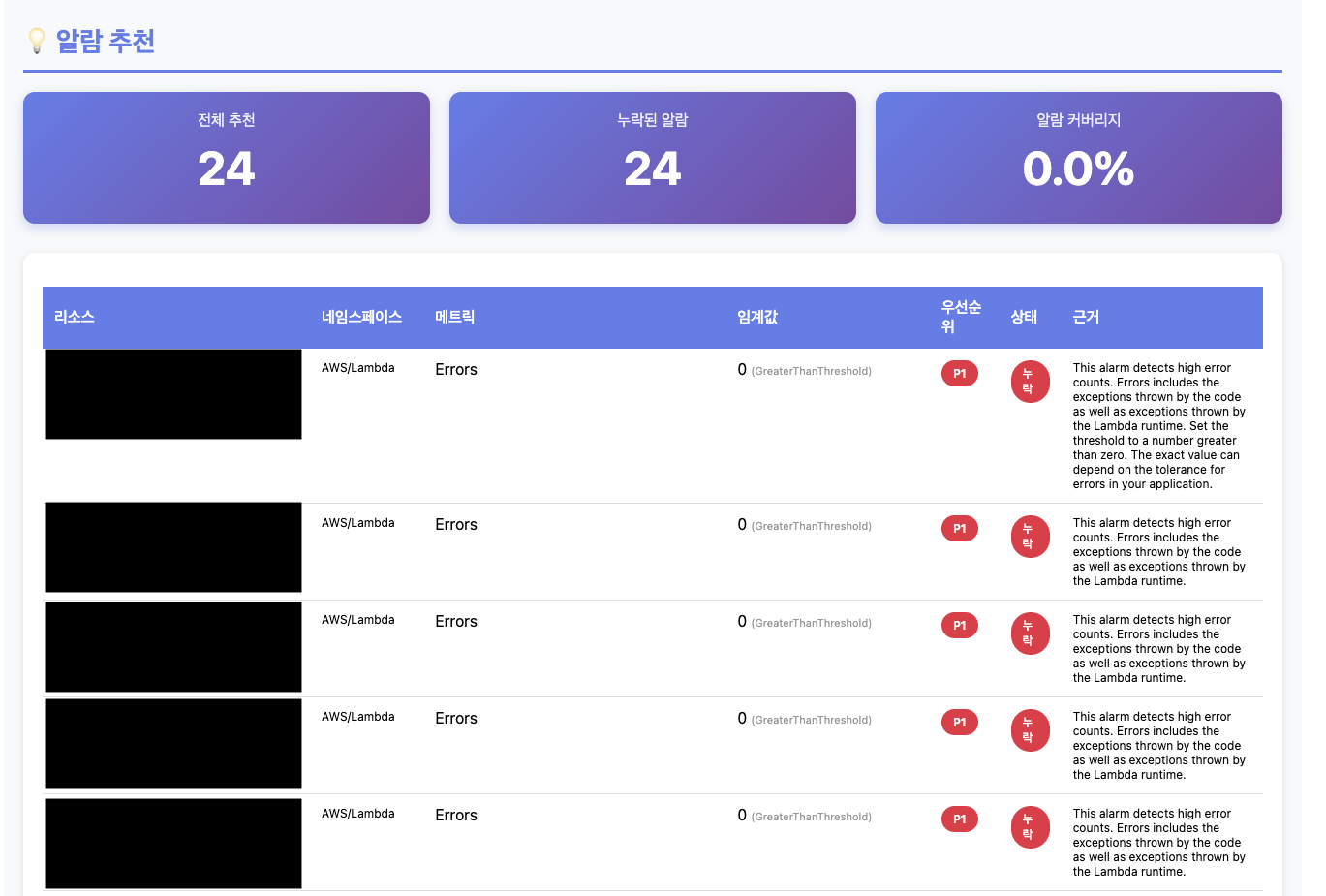
위 알람 추천은 Cloudwatch MCP 서버 내부에 있는 알람 데이터를 기반으로 가져온다.
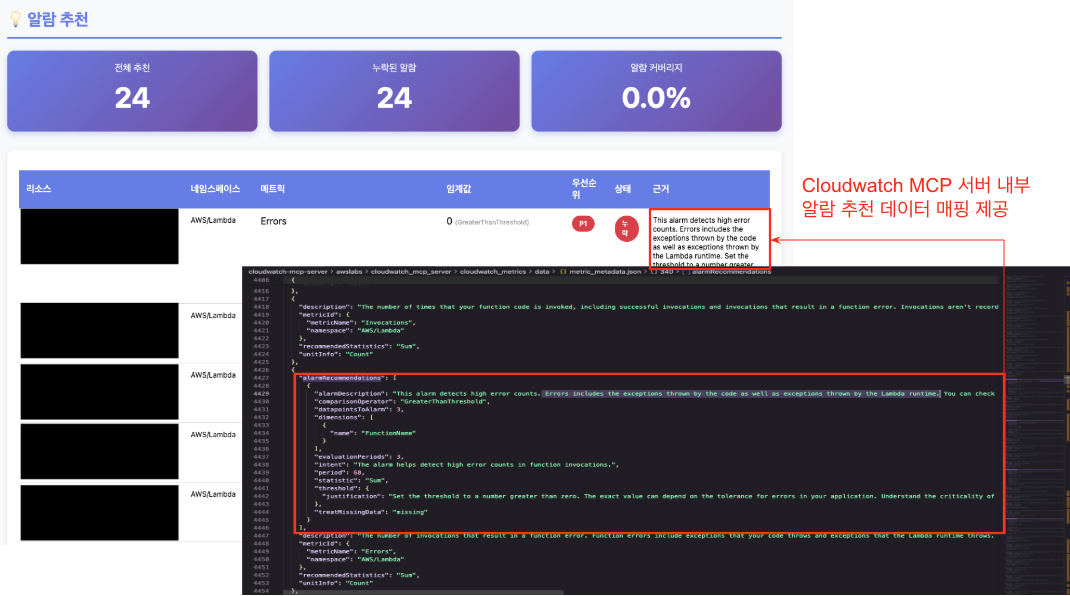
다만, 알람 자동 설정 배포의 경우 추가 개선이 필요하다.
CloudFormation MCP 서버를 써야하나 싶지만, 이건 다음 계획으로 미룬다.
추가 계획
이번 장에는 담지 못했지만, 추가 계획안은 다음과 같다. 추후 시간이 된다면 기술할 예정이다.
- EKS 디버깅 에이전트 고도화 : 디버깅 마스터 PPT ( https://devfloor9.github.io/engineering-playbook/slides/eks-debugging/ ) 를 플레이북 형태로 만들어 트러블슈팅 에이전트 추가 & 테스트
- 알람 자동 설정 배포 제공 : discovery_agent 의 알람 자동 설정 배포의 내용이 전부 나오고 제대로 등록되게 고도화
'AI' 카테고리의 다른 글
| EKS 최적화 보고서 기능 개발(보안 편) (0) | 2026.04.12 |
|---|---|
| EKS 최적화 보고서 기능 개발(스케일링 편) (0) | 2026.04.04 |
| EKS 최적화 보고서(CloudOpsOne) 추가 기능 개발 - 노드 / 네트워크 편 (0) | 2026.03.25 |
| Strands Agent와 MCP를 활용한 EKS 최적화 보고서 자동 생성하기 (0) | 2026.03.17 |
| GenAI with Inferentia & FSx Workshop using EKS (0) | 2025.04.20 |